News

Cloudflare Sentinel

Automatically block the bad actors probing your sites — vulnerability scanners, 404 floods, and attackers tripping your firewall — right at the Cloudflare edge, across every site you manage. Without ever locking out your own people.

Stop the noise. Block the threats. Keep your people in.

Every public website is under constant, automated assault — bots crawling for forgotten .env files, scanners hunting known vulnerabilities, and floods of requests probing for a way in. Most of it never reaches a human, but it fills your logs, wastes resources, and occasionally finds something it shouldn’t.

Lavawall® Cloudflare Sentinel watches the traffic to every site you connect and automatically blocks the IP addresses behaving like attackers — at Cloudflare’s edge, before they ever reach your origin server. It runs quietly in the background, learns which traffic is hostile, and keeps your sites clean.
  • Blocks vulnerability scanners and reconnaissance — the bots probing for known exploits, exposed config files, and admin panels.
  • Blocks 404 floods — sources hammering your site with requests for things that don’t exist, a classic signature of scanning and brute-forcing.
  • Blocks attackers that trip your Cloudflare firewall — repeat offenders caught by your existing WAF rules.
  • Works across all of your sites at once, and across every site for every client you manage.
  • Runs on the Cloudflare Free plan — no premium subscription required.

Lavawall Cloudflare Sentinel dashboard showing blocked offenders and status

It will never lock you out

The single biggest fear with automatic blocking is obvious: what if it blocks me? A busy office, a monitoring service, or your own security scanner can easily generate traffic that looks exactly like an attack. Block it, and you’ve locked your client out of their own website — or knocked out the very tools you use to protect them.

Cloudflare Sentinel is built so that simply cannot happen. It automatically recognizes your own offices, devices, and trusted tools and places them on a protected allow-list. Those addresses are never blocked, no matter how much traffic they generate or how much it resembles an attack. You also keep a manual allow-list for anything else you want to guarantee stays connected.

  • Your own infrastructure is protected automatically — no manual IP entry, no guesswork.
  • A high-volume scanner running from your office? Recognized and skipped, with a clear note in the log explaining why.
  • Private, internal, and reserved addresses are never touched.
  • Add any extra trusted address yourself in seconds.

The result: aggressive protection against real attackers, with zero risk of self-inflicted outages.


Automatic allow-listing of your own offices and tools so they are never blocked

Watch first, block when you’re ready

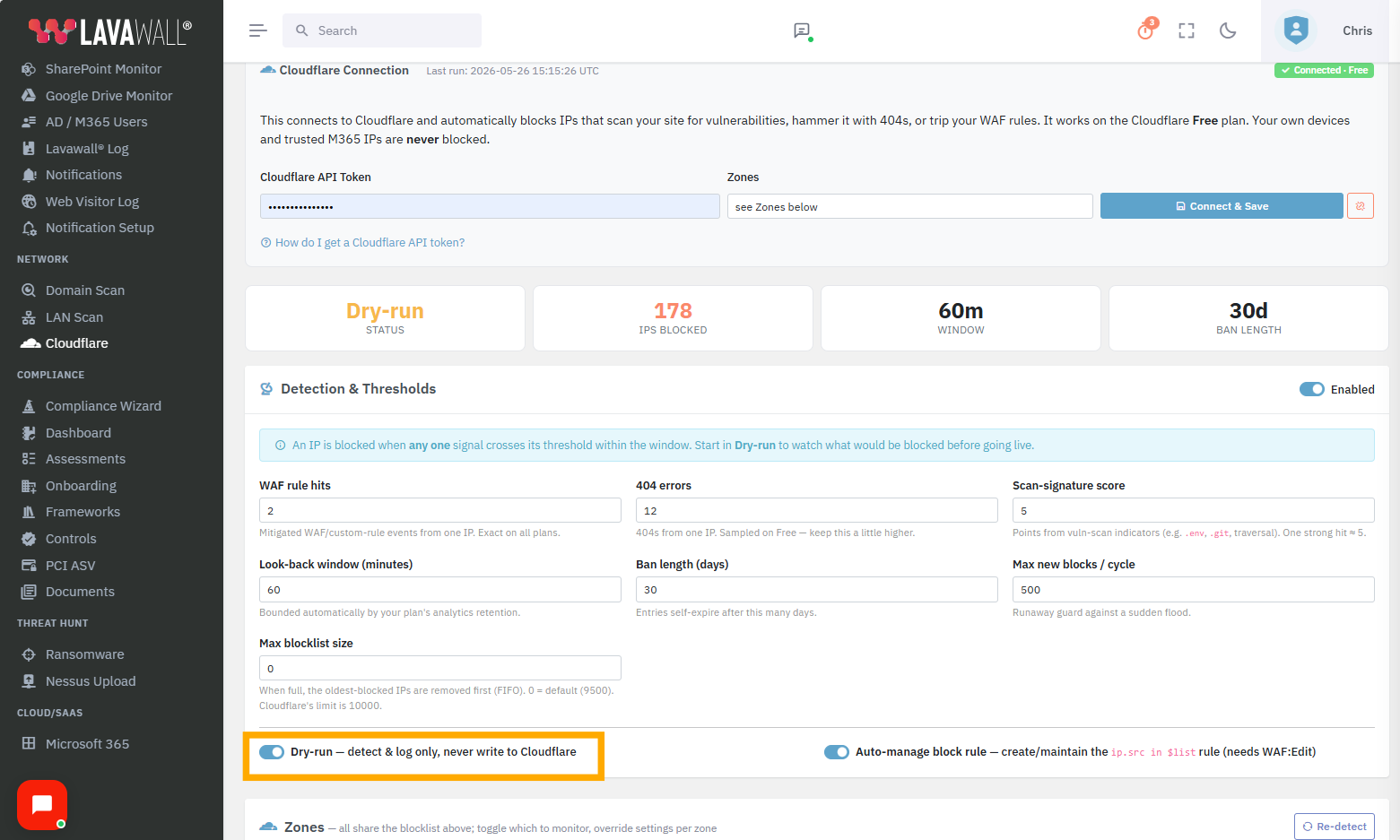
You don’t have to flip a switch and hope. Cloudflare Sentinel includes a watch-only mode that detects and logs every IP it would block — without changing anything at Cloudflare. Let it run for a day, review what it caught, fine-tune the sensitivity, and turn on active blocking only when you’re confident. You can even run some sites live while keeping others in watch-only mode.

When you’re ready, blocking happens automatically and continuously — no babysitting required.


Watch-only dry-run mode previewing what would be blocked

Proactive list management — it cleans up after itself

Cloudflare limits how many addresses you can keep on a blocklist. A naïve blocker just keeps adding until it hits that ceiling and silently stops protecting you — and then leaves you to clear it out 25 entries at a time by hand.

Cloudflare Sentinel manages the list for you, start to finish:

  • Blocks expire on their own. An address that stops attacking is automatically released after a period you choose — the list never grows forever.
  • Stale entries are cleaned up automatically. Addresses that haven’t been seen attacking in a long time are retired without you lifting a finger.
  • The most-active threats stay blocked. When space is tight, the oldest and least-active offenders make way first, so an attacker hitting you today is always prioritized over one that vanished months ago.
  • It stays within Cloudflare’s limits — you’re shown how much capacity is in use across your account, so you’re never caught by surprise.
  • Bulk clean-up tools let you purge old entries from any list in one action, instead of Cloudflare’s tedious 25-at-a-time deletion.

You get continuous protection that maintains itself — no manual housekeeping, no silent failures when the list fills up.


Account list capacity and proactive blocklist management

Built for the way you actually work

Whether you protect one website or a hundred across dozens of clients, Cloudflare Sentinel fits in without adding overhead.

  • Every site, automatically. Connect an account once and Sentinel finds and protects all of its sites — with per-site tuning when you need it and shared defaults when you don’t.
  • Multi-tenant by design. Manage every client from one console, with each client’s data and settings kept strictly separate.
  • Tunable sensitivity. Set how aggressive blocking should be, how long blocks last, and which signals matter — globally or per site.
  • Clear visibility. See what’s currently blocked and why, lift a block in one click, and review a full activity log.
  • Plain-language status. No cryptic error codes — the console tells you what’s happening in words you can act on.

Multi-tenant Cloudflare Sentinel management for MSPs

The outcomes

  • Quieter logs and lighter origins. The constant scanning and probing is stopped at the edge, so it never reaches your servers.
  • A smaller attack surface. Reconnaissance is the first step of most attacks — cut it off and you stop attacks before they start.
  • No self-inflicted outages. Automatic allow-listing means your own people and tools are never the casualty.
  • Protection that lasts. Self-managing lists mean it keeps working months from now without anyone tending it.
  • Less manual work for your team. No hand-curated block lists, no 25-at-a-time clean-ups, no 3 a.m. “why is the site blocking us” calls.


What’s included

Every deployment of Lavawall® Cloudflare Sentinel includes:

  • Automatic blocking of scanners, 404 floods, and firewall-tripping attackers across all connected sites
  • Automatic allow-listing of your own offices, devices, and tools
  • A manual trusted-address list you control
  • Watch-only dry-run mode, per company and per site
  • Proactive, self-managing blocklist with automatic expiry and clean-up
  • Account capacity visibility and bulk list clean-up tools
  • Multi-site and multi-tenant management from one console
  • Currently-blocked view with one-click unblock and a full activity log
  • One-click removal from Cloudflare if you ever want to uninstall

Cloudflare Sentinel is part of the Lavawall® console and works on the Cloudflare Free plan. Connect an account in minutes and start in watch-only mode the same day.


Frequently asked questions

Will Cloudflare Sentinel ever block my own staff, office, or tools?

No. It automatically recognizes your own offices, devices, and trusted tools and keeps them on a protected allow-list. They are never blocked — even when they produce traffic that would otherwise look like an attack, such as a monitoring service or your own security scanner generating thousands of requests. You can add any other address you want guaranteed access for, too.

Does it really work on the Cloudflare Free plan?

Yes. Cloudflare Sentinel is designed to protect sites on the Cloudflare Free plan as well as paid plans. You don’t need a premium Cloudflare subscription to get automatic edge blocking.

What does it actually block?

Three kinds of bad behaviour: vulnerability scanners and reconnaissance bots (the ones probing for exposed files and known exploits), sources flooding your site with requests for pages that don’t exist (a hallmark of scanning and brute-forcing), and repeat offenders caught by your existing Cloudflare firewall rules. You control how sensitive each of these is.

Can I preview what it would block before turning it on?

Yes. Watch-only mode logs every address it would block without changing anything at Cloudflare. Run it, review the results, adjust the sensitivity, and switch to active blocking when you’re confident — site by site if you prefer.

Won’t the blocklist eventually fill up and stop protecting me?

No. The list manages itself: blocks expire automatically, entries that haven’t been active in a long time are retired, and when space is tight the oldest and least-active offenders are removed first so today’s attackers stay blocked. The console also shows how much of your Cloudflare account’s capacity is in use, and includes bulk clean-up tools so you’re never deleting entries 25 at a time by hand.

How long does an address stay blocked?

For a period you choose. After that, if the address has stopped attacking, the block is released automatically. Persistent attackers stay blocked; one-off offenders age out on their own.

Does it work across multiple sites and multiple clients?

Yes. Connect an account once and Sentinel protects all of its sites automatically. If you manage many clients, you run everything from a single console with each client’s data and settings kept strictly separate.

What if I want to remove it?

One click. Cloudflare Sentinel can cleanly remove its blocking rule from every site and, if you choose, delete its blocklist — leaving your Cloudflare account exactly as it was. It only ever touches what it created.

Will it interfere with my existing Cloudflare rules?

No. It adds its own clearly-labelled rule and its own managed list, and leaves everything else on your account untouched. The console even shows you which of your rules reference which lists, so nothing is a mystery.

If you have any questions or need further assistance, feel free to reach out through our chat, phone, or email on our contact page!