Application deployment
Deploy applications with ease
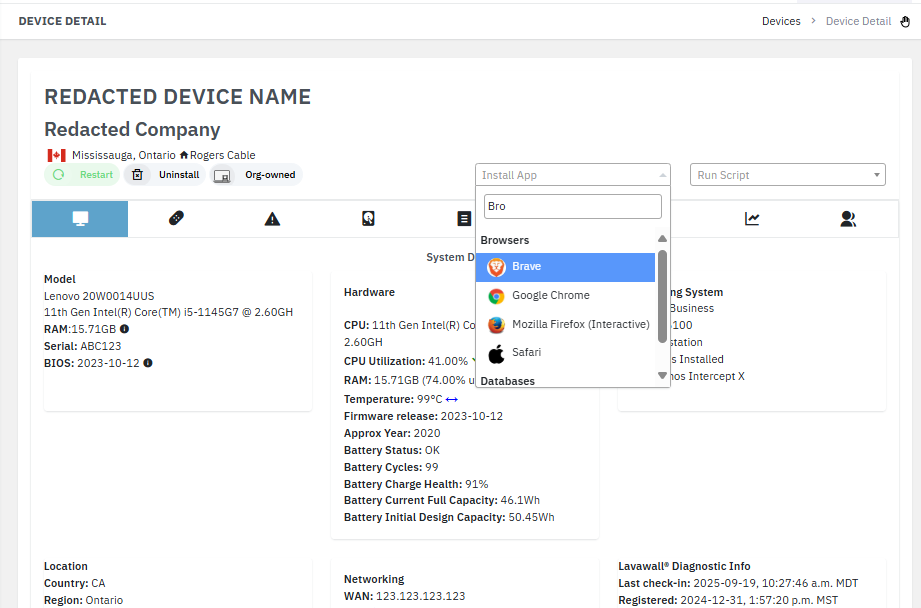
Lavawall® deploys applications to managed devices from a continually growing list that is sorted, searchable, and simple to use. From the device detail, start typing an application or category name and install it in a click, without remoting into the machine or chasing down an installer.
Start free, no credit card Browse the catalogue
Searchable · categorized · one-click · remote deployment
Search and click
In the device detail, start typing either a category or an application name to filter the installation options. You can also browse the categorized list when you would rather explore than search. Either way, deployment is a single action from the same console you already use to manage the endpoint. The list is easy to search, intuitively organized, and configured for you.
A broad, growing catalogue
Lavawall® already tracks 7,400+ applications, and the deployable catalogue keeps growing. The platform organizes installable software into categories so the right tool is always a couple of keystrokes away. Current categories include:
- Drivers
- Browsers
- File Transfer
- Software Development
- Genealogy
- System Management
- Compression
- Documents
- Gaming
- Images and Design
- Music and Video
- Messaging
- Productivity
- Frameworks and Runtimes
- Security
- Storage and Sharing
- Password Managers
- Telephony and Meetings
- Remote Management
- Maps and Navigation
- VPN and Zero Trust
- Databases
- Accounting and Finance
- System Administration
- Exercise and Fitness
Built for MSP fleets
Because deployment happens from the device detail in the Lavawall® console, an application can be pushed to any managed endpoint remotely, across the organizations you support. Standardizing the software your clients run (browsers, security agents, password managers, and productivity tools) becomes a matter of search and click rather than a manual visit or a hand-built installer package.
Pair application deployment with custom scripting when you need to go beyond a straight install, for example to configure an application after it lands or to handle a one-off task across a set of organizations.
Frequently asked
- How do I find an application to install?
- Open the device detail and start typing either a category or an application name to filter the installation options instantly, or browse the categorized list. Pick the application and Lavawall® handles the install.
- What kinds of software can I deploy?
- Browsers, security tools, password managers, productivity suites, remote management, VPN and zero trust, developer frameworks and runtimes, databases, drivers, and many more categories. The catalogue keeps growing.
- Do I install from the device I am managing?
- No. You deploy from the device detail inside the Lavawall® console, so an application can be pushed to a managed endpoint remotely without touching the machine directly.
- Is the application catalogue searchable?
- Yes. Every application is sorted into categories and searchable, so you can filter by category or by application name to reach what you need quickly.