Security moment
Worried you're seeing ransomware warning signs?
Trust that instinct.
Here are the ransomware warning signs to look for and what to do next, free to follow, no signup required. Ransomware crews spend days or weeks staging before they encrypt, so if something feels off, the window to stop it may still be open.
Call now: 1-403-538-5053 See the checklist
ThreeShield's incident line answers real emergencies from real humans, or contact us online.
The warning signs
1. New admin accounts you didn't create
Attackers create their own privileged accounts so they survive password resets. Check Active Directory and Entra ID for accounts created in the last few weeks, especially ones with plausible-sounding names like "svc-backup" or "IT-admin2".
2. Antivirus or backup software mysteriously disabled
Ransomware crews disable EDR, antivirus, and backup agents before encrypting so nothing interferes and nothing recovers. If security tooling stopped reporting on several machines around the same time, treat it as hostile until proven otherwise.
3. Mass file renames or new file extensions
Thousands of files changing extension or gaining strange suffixes in minutes means encryption has started. A smaller burst on one share may be a test run, which means you still have most of your network to save.
4. RDP or VPN logins at odd hours
Look for remote logins at 2 a.m. local time, from unfamiliar locations, or from accounts that never use remote access. Staging work happens when nobody's watching.
5. Shadow copies and backups being deleted
Commands like vssadmin delete shadows in your logs, or backup jobs and restore points quietly vanishing, are among the last things attackers do before encrypting. If you see this, you are likely hours away, not days.
What to do right now
6. Isolate, but don't power off
Disconnect suspicious machines from the network (pull the cable, disable Wi-Fi, or isolate at the switch). Do not shut them down: memory holds evidence and sometimes encryption keys, and some strains corrupt files further on reboot.
7. Protect your backups first
Verify your backups exist and are intact from a device the attacker can't reach rather than a possibly compromised admin workstation. Disconnect or lock down backup repositories now; encrypted backups are the difference between a bad week and a business-ending event.
8. Preserve, and call for help before paying anyone
Keep logs, don't wipe machines, and write down a timeline while it's fresh. Then talk to an incident responder and your insurer before engaging with any ransom demand. Payment doesn't guarantee recovery, may be legally restricted, and is sometimes unnecessary because backups or free decryptors exist.
How Lavawall® hunts your fleet for these signs
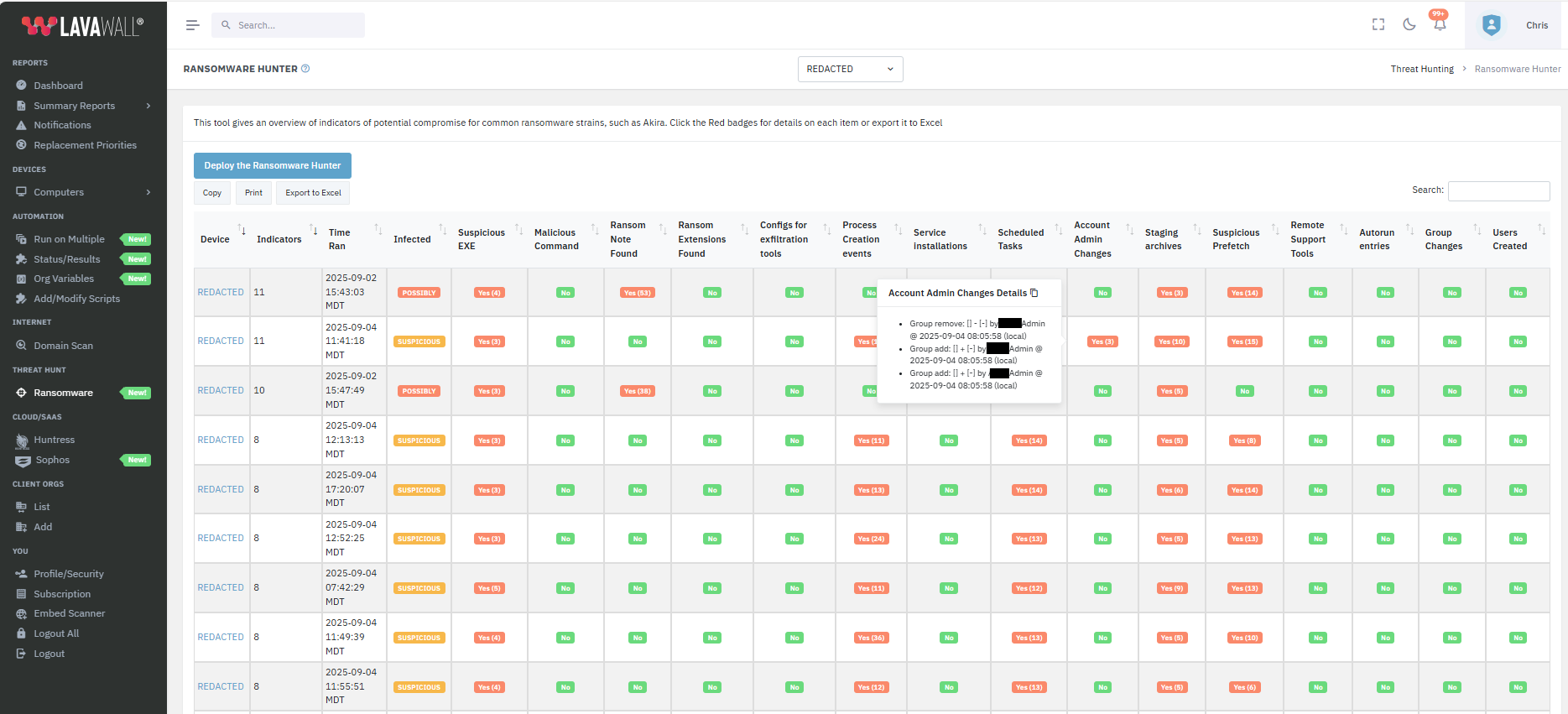
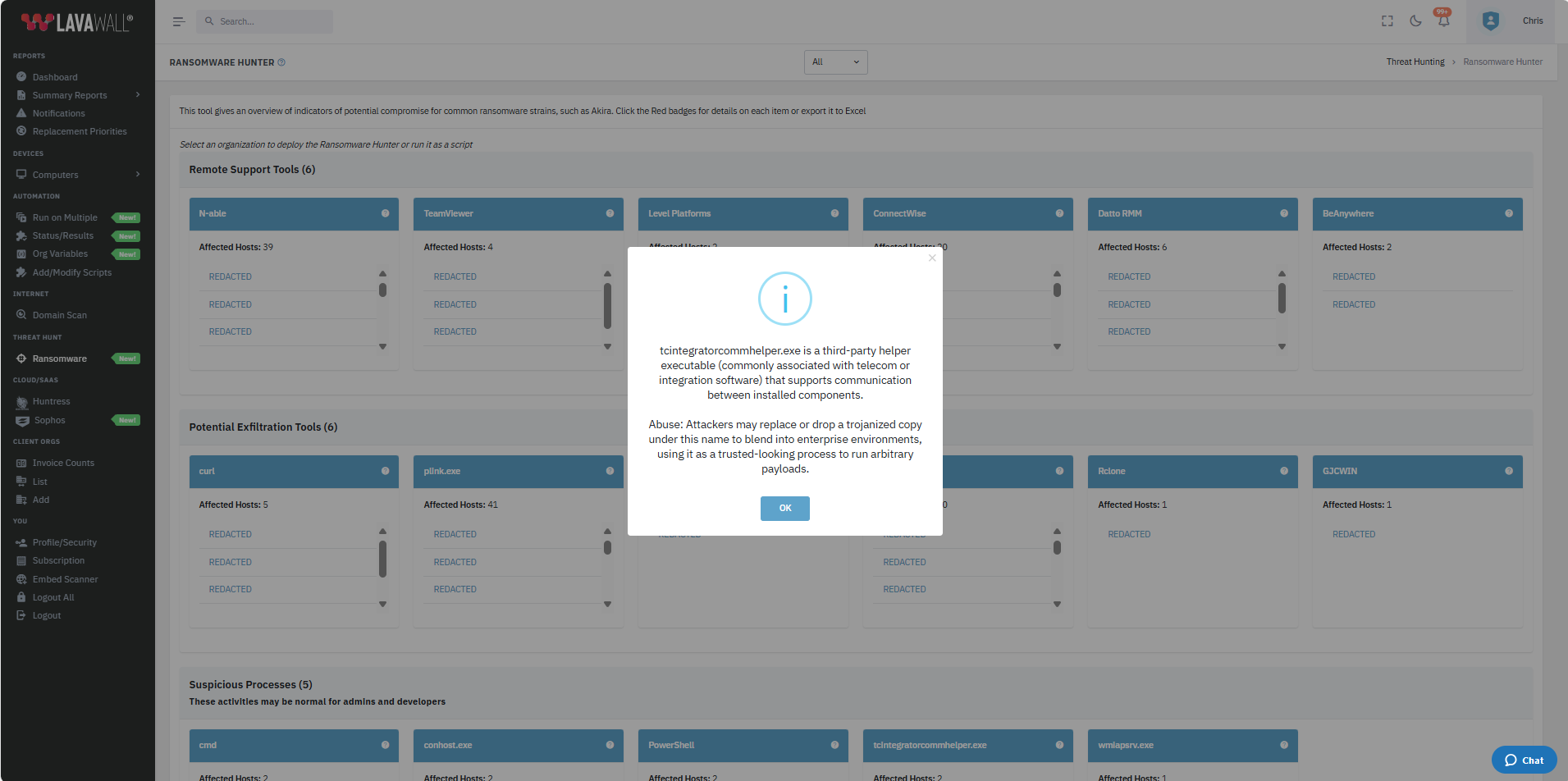
The warning signs above are what the Lavawall® Ransomware Hunter goes looking for on every computer. Instead of waiting for antivirus or EDR to react while ransomware is running, it does a deep scan for the pre-warning signs they skip and shows you what it found in one summary.
On each machine, here is what it actively hunts for:
- Ransom notes (it started with Akira and now covers the most common ransomware families).
- Partially and fully-encrypted files.
- Data-exfiltration tools used in hybrid attacks, plus archives staged for theft before encryption.
- Suspicious executable files and executables primed to run.
- Malicious commands and suspicious programs that were run recently.
- Remote-access tools and RMMs that attackers install to keep their foothold.
- Living-off-the-land activity: the legitimate-looking processes attackers abuse to stay hidden.
- Newly-installed services and programs set to run on boot or login.
- Changes to scheduled tasks.
- Changes to administrator accounts, user accounts, and account groups.
The summary shows a count of what was found across your fleet. Click any red badge to open the detail. A typical computer finishes in 5 to 15 minutes, and it also runs in Lavawall®'s monthly health scans. See the full Ransomware Hunter.
See the staging phase before the encryption phase
Ransomware Hunter
Lavawall® hunts for the specific staging behaviours of active ransomware groups (new admin accounts, disabled protections, shadow-copy deletion) and flags them while there's still time to act.
See what it hunts for →Patching for 7,400+ apps
Most ransomware gets in through an unpatched edge device or application. Lavawall® automates patching across your fleet so the front door isn't left open.
Explore patching →M365 breach detection
Ransomware operators increasingly start in the cloud. Lavawall® correlates risky sign-ins, privilege changes, and persistence tricks across Microsoft 365 and your endpoints.
Explore M365 security →If you're seeing these signs, don't work it alone.
ThreeShield, the CISSP/CISA team that builds Lavawall®, runs ransomware incident response: containment, backup verification, negotiation-stage advice, and recovery. Calling during the staging phase can be the difference between an incident and a catastrophe.
Common questions
- I see some of these signs but nothing is encrypted yet. Do I still have time?
- Possibly. Attackers often spend days or weeks inside a network before encrypting, and that dwell time is your window. Isolate affected machines, protect your backups, and get experienced help immediately. Acting during staging is far cheaper than acting after encryption.
- Should I power off machines that look infected?
- No. Isolate them from the network, but don't power them off. Memory can hold encryption keys and attacker tooling that responders need, and some ransomware damages files further on reboot.
- Should we just pay the ransom?
- Not before talking to an incident responder and your insurer. Payment doesn't guarantee recovery, may be legally restricted, and is sometimes unnecessary. ThreeShield can assess your real options first. Call 1-403-538-5053.