Google Workspace security
Google Workspace, watched as closely as M365.
Lavawall® gives Google Workspace the same tenant-level monitoring as Microsoft 365: risky sign-ins, OAuth grants, sharing changes, admin edits, configuration issues, file changes, and unusual file and email access patterns, all from one console. Most security tools treat Workspace as an afterthought.
Start my free trial, no credit cardSee what it watches
Sign-ins · OAuth · sharing changes · file changes · unusual access · config issues
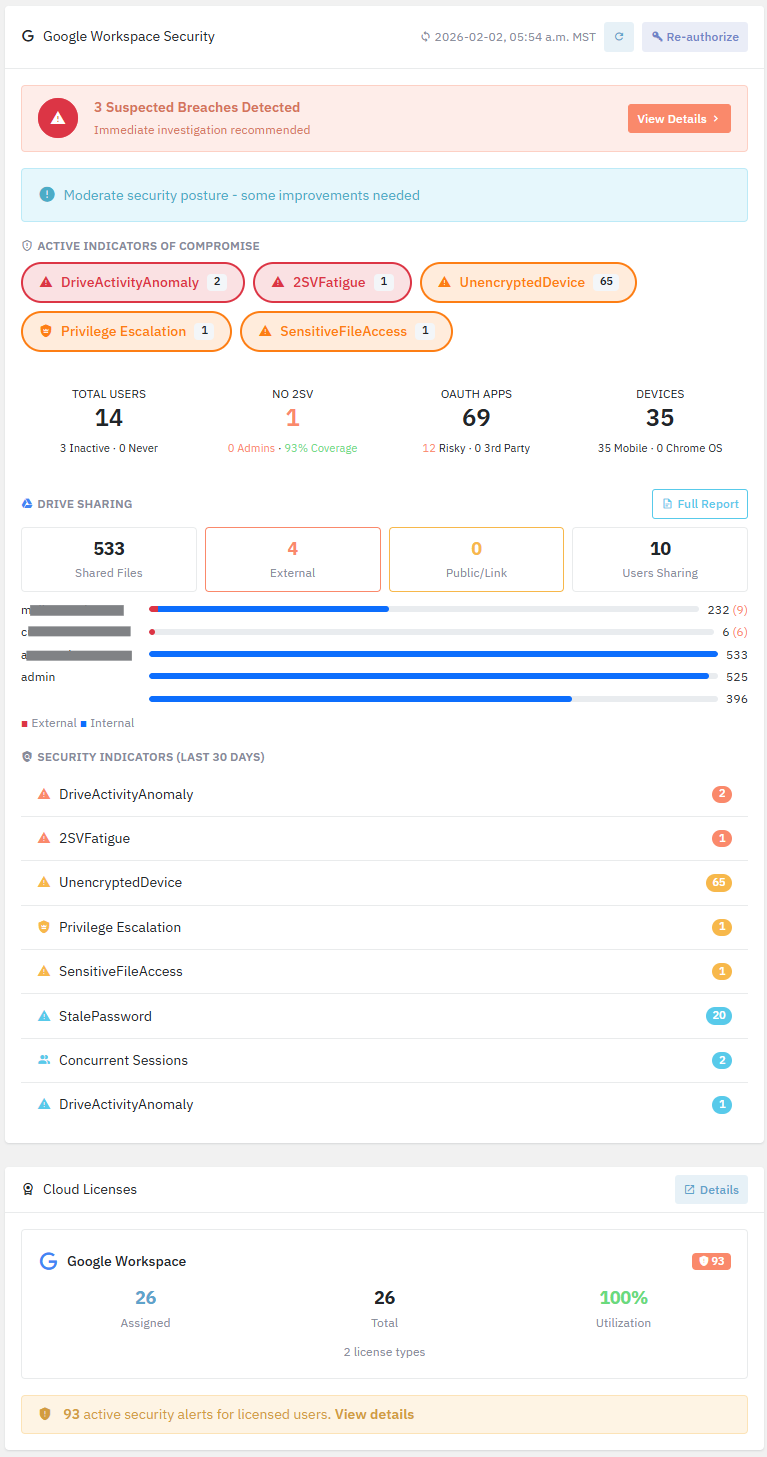
The signals that matter in Workspace
Risky sign-ins & OAuth grants
Unexpected geographies, impossible travel, and newly consented apps are flagged and enriched. These are the earliest signs of a compromised account.
Sharing & permission changes
Files and Shared Drives suddenly opened to "anyone with the link," external shares, and permission escalations surface immediately.
Admin & directory edits
Role changes, group membership edits, and mail routing and forwarding changes are logged with who, what, and when, and can be rolled back with Workspace config backup.
User & system configuration issues
Lavawall surfaces risky user and system configuration issues across the tenant, such as weak or missing 2-step verification and over-permissive sharing defaults, so misconfigurations get fixed before someone exploits them.
File changes & unusual access patterns
See file changes as they happen, and get flagged on unusual file and email access volumes and patterns, so a compromised or malicious account harvesting Drive and Gmail stands out early.
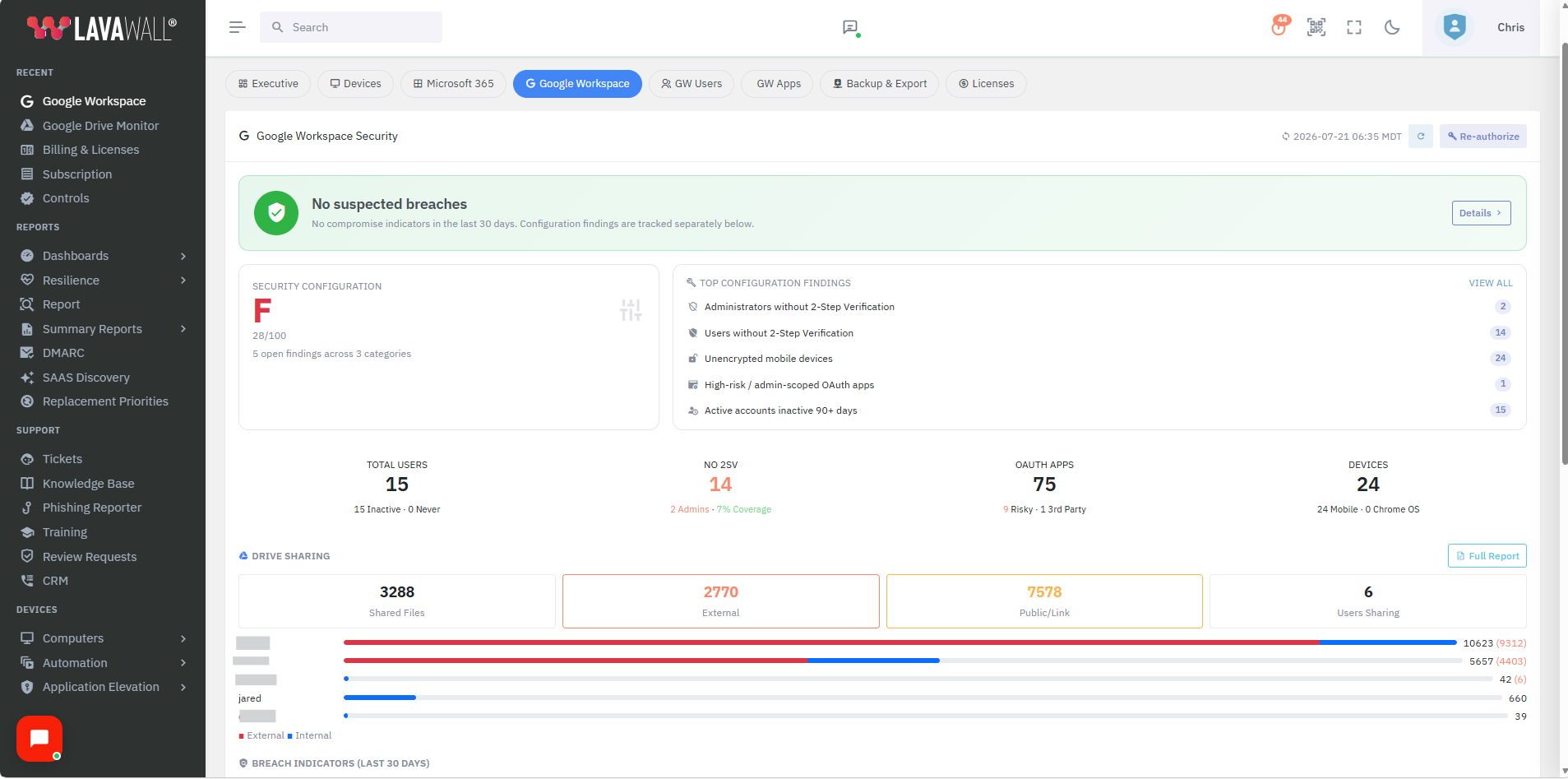
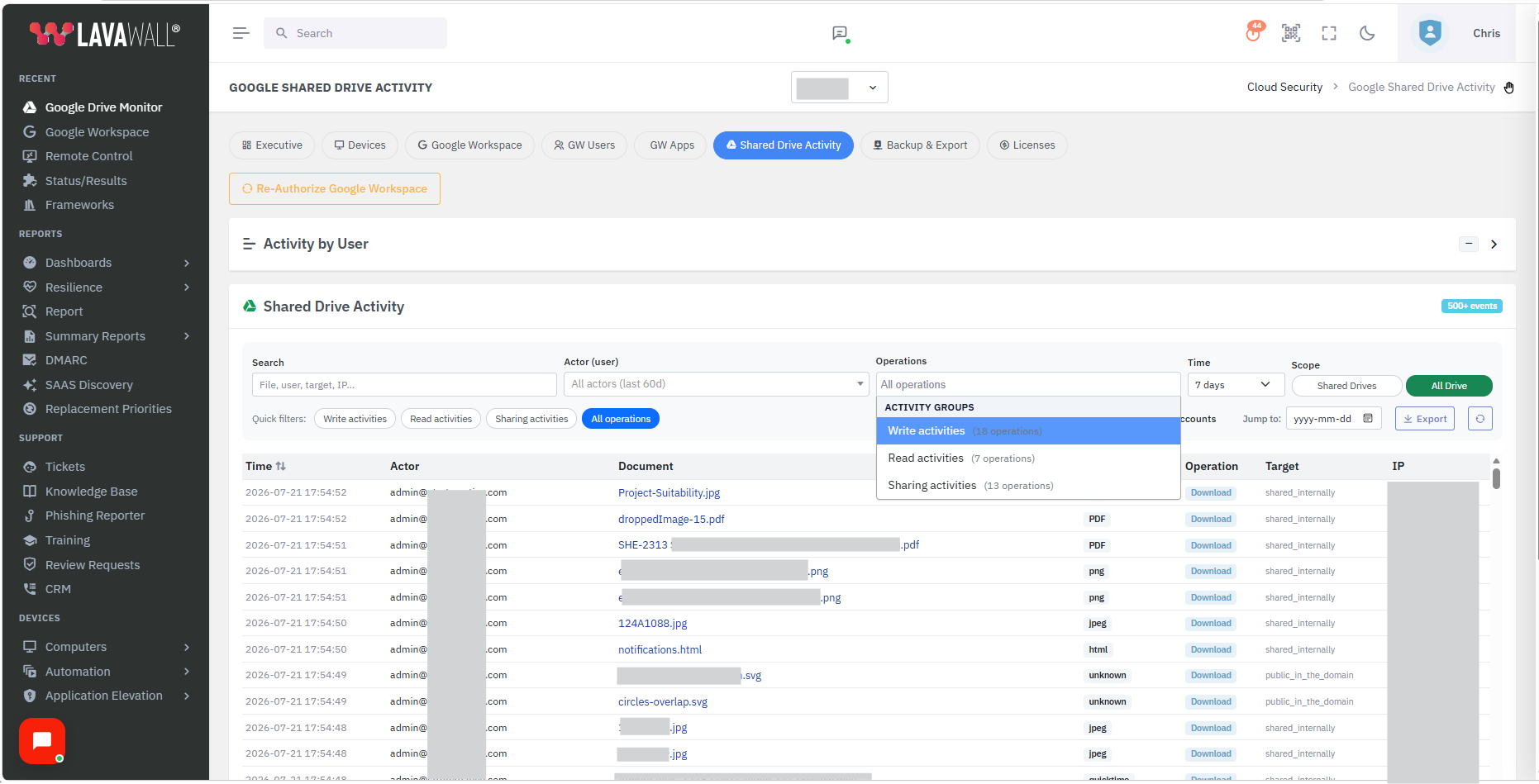
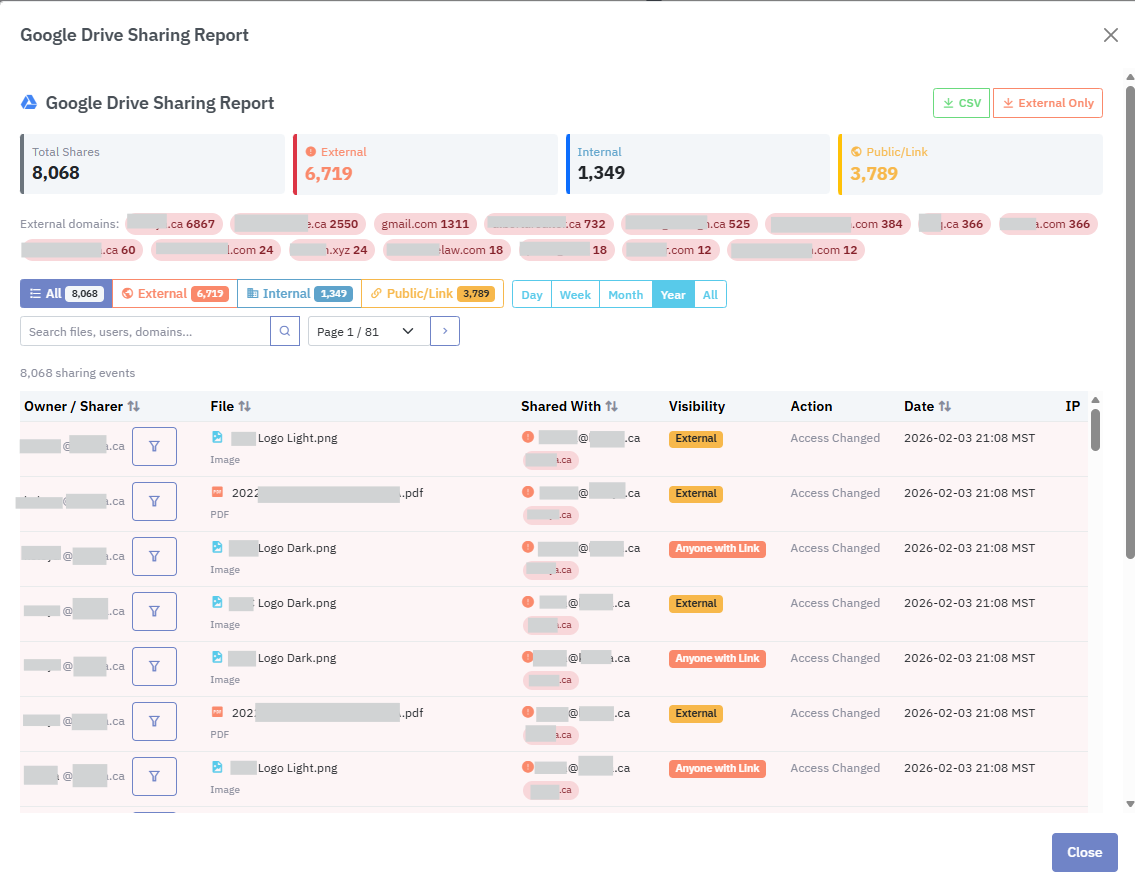
The named attacks we catch in Workspace
A compromised Workspace account plays out much like an M365 one. Someone phishes the login, consents an OAuth app to keep access, sets a forwarding rule, then quietly opens a Shared Drive to “anyone with the link” and pulls the files down. Lavawall® watches every step, so you can answer “who touched this?” before it becomes an incident.
This is Lavawall®’s ITDR approach (a growing list of risk indicators) applied to Google Workspace with the same depth it gives Microsoft 365.
- OAuth token abuse and grants to risky third-party apps
- Suspicious sign-ins from unexpected locations
- Impossible-travel logins with real distance and speed analysis
- Credential stuffing, brute force, and password-spray attempts
- MFA bombing and MFA fatigue
- Session hijacking and lateral movement
- Mail forwarding and suspicious mailbox rules
- Super-admin, role, and directory changes
- Privilege escalation
- Dormant account reactivation and activity on disabled accounts
- Shared Drives and files opened to “anyone with the link” or shared externally
- Unusual file download, deletion, and mass-sharing activity
- Unusual mail access and risky configurations
Start free Free plan · no credit card · month-to-month
How to connect Google Workspace
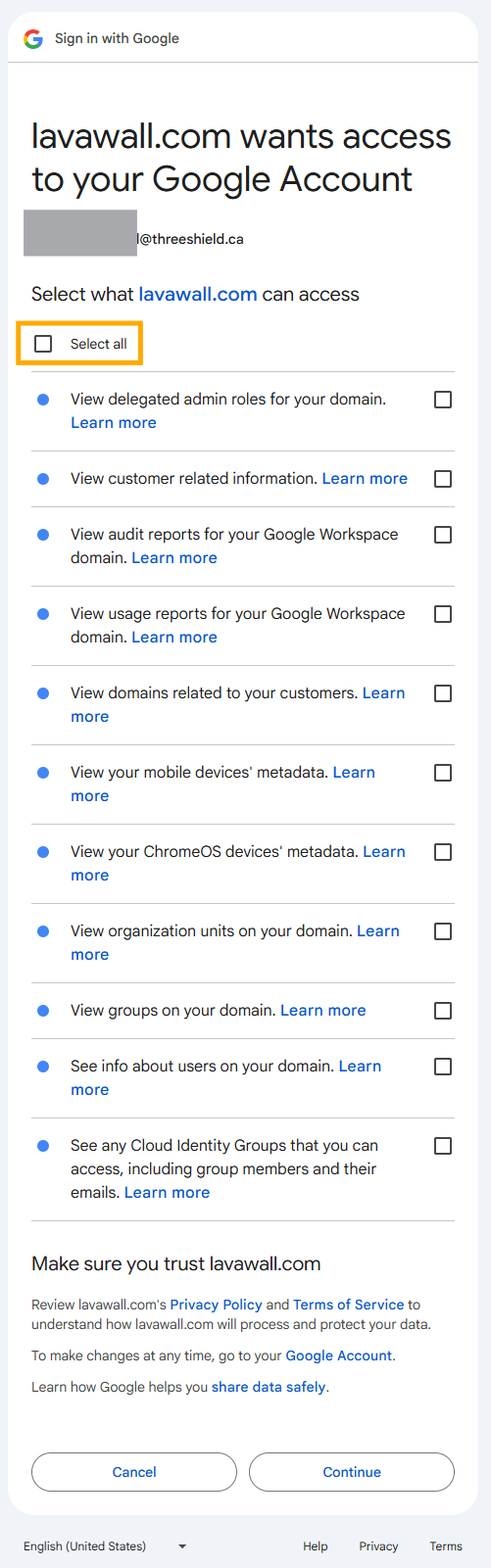
Connecting Google Workspace is what turns on breach detection. It takes a few minutes and one sign-in from a Google super-admin. Lavawall® uses Google’s standard OAuth authorization, so you can see exactly what it’s allowed to read and revoke access from your Google Admin console at any time.
1. Start the connection in Lavawall
In the console, open the Cloud/SaaS area, add Google Workspace, and choose Connect. You’re sent to Google to authorize the connection.
2. Sign in as a Google super-admin and review the permissions
Sign in as a super-admin. Google shows exactly what Lavawall® is asking for: read-only access to the sign-in, sharing, directory, and audit signals it monitors for breaches. Review the permissions and approve.
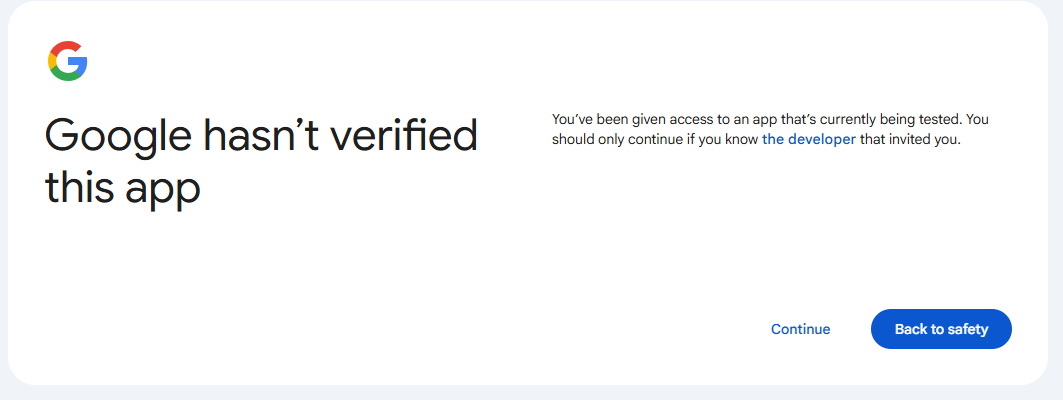
3. Get past the “hasn’t verified this app” screen
Google will show a “Google hasn’t verified this app” screen. This is expected, and it’s safe to continue. Lavawall® connects privately into your own Workspace tenant using Google’s standard authorization, so Google shows its normal caution notice for a direct, unlisted connection like this one. Approving it is what switches on breach detection, so Lavawall® can watch your tenant for risky sign-ins, suspicious OAuth grants, external sharing, and admin changes. Click Advanced, then Continue to authorize Lavawall®. Your sign-in stays with Google, and you can review or remove the connection from your Google Admin console whenever you like.
4. Monitoring begins
Lavawall® begins pulling Workspace signals right away, and breach-detection findings appear on your dashboard within minutes.
Worried about a Workspace account?
ThreeShield, the CISSP/CISA team behind Lavawall®, runs Google Workspace incident response and hardening.
Common questions
- What does Lavawall monitor in Google Workspace?
- Risky sign-ins, OAuth grants, sharing and permission changes, admin/directory edits, user and system configuration issues, file changes, unusual file and email access patterns, and mailbox/license health. The same depth it gives Microsoft 365.
- Can I watch both Google and Microsoft from one place?
- Yes. Mixed environments are monitored side by side with unified alerting.
- Does it back up Google Workspace too?
- Yes. Separate Google Workspace backup and configuration backup are available as modules.