Phishing Reporter & triage
You told users to report phishing.
Now the help desk is drowning.
Lavawall® gives the user immediate risk information the moment they check a message, so about 93% of suspected phishes never become a support ticket at all. It still records that the user checked, so you can reward good security habits, and only the real threats reach your team. You did the right thing and trained people to report suspicious email. The reward was techs triaging hundreds of reported messages a month.
Start my free trial, no credit card See how it works
Instant user feedback · about 93% never become a ticket · only real threats escalate
Where the tickets stop
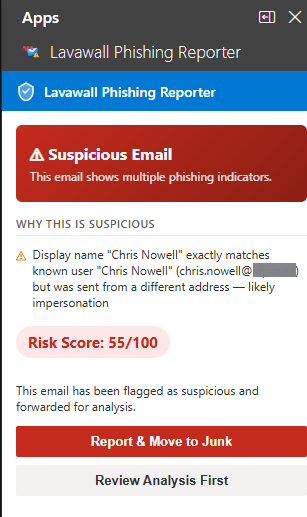
The user gets an answer instead of a ticket
One click in Outlook or webmail, and Lavawall analyzes the email on the spot: safe, suspicious, or malicious. The person gets an immediate, plain-language answer, so roughly 93% of suspected phishes are resolved for the user right there and no ticket is ever created.
You still see the good behaviour
Even when no ticket is filed, Lavawall records that the user checked the message. So you can spot the people who are actively watching out for suspicious email and reward that good security behaviour with positive reinforcement, instead of only hearing from users when something goes wrong.
The gateway broke "hover over the link." This fixes it.
You spent years teaching people to hover over links, then your secure email gateway rewrote every URL and made that impossible. Lavawall's plugin unwraps the rewritten links and shows users the real destination, plus a deep dive through PDFs and phishing relays your filter obscured.
Only real threats reach your team, pre-analyzed
Genuinely suspicious mail is auto-triaged, prioritized, and handed to your techs with the analysis already done. And you see who is actively engaged with their email security and who needs a nudge, feeding straight back into training.
What actually reaches your analysts
When a message is genuinely suspicious, it lands in one console with the analysis already done: the sender, the authentication verdicts, the suspicion score and its reasons, and every link and attachment. Wrapped URLs from Proofpoint URL Defense, Mimecast URL Protect and Egress Defend are unwrapped where the true destination can be safely recovered, so your team sees where a link really goes instead of the security vendor’s domain. Impersonation is called out too: a display name that matches an internal user while the address differs.
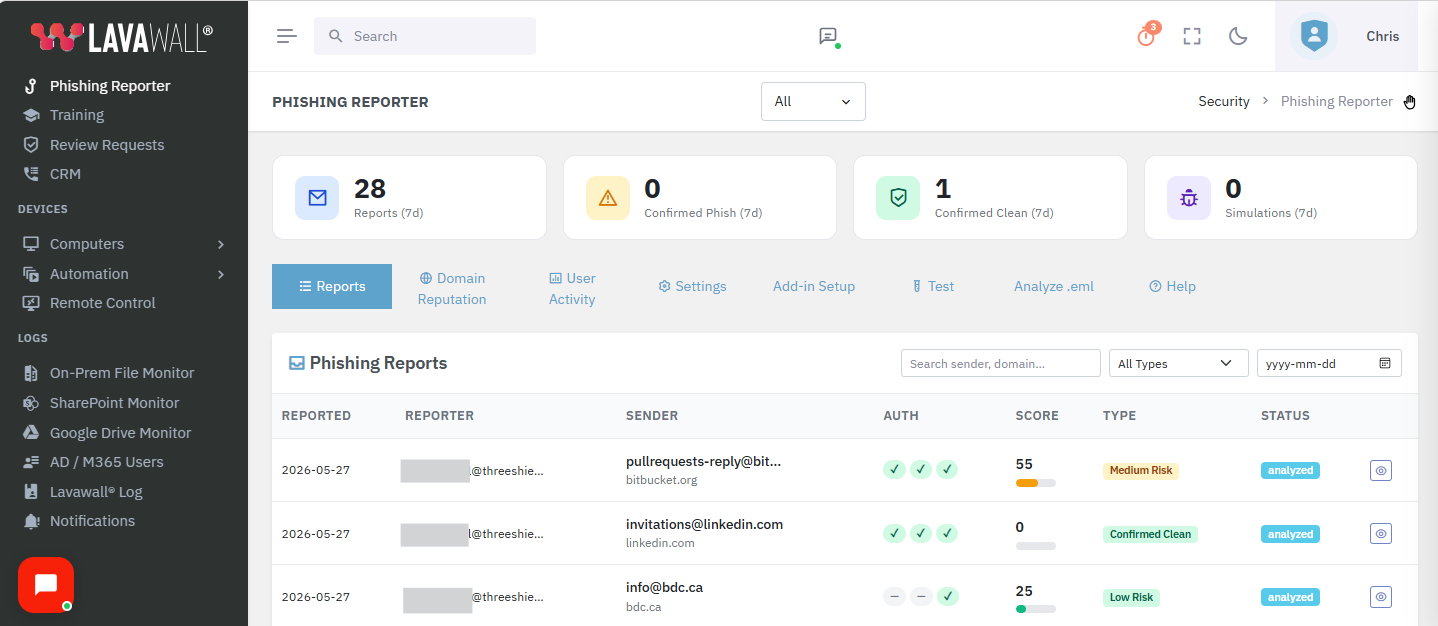
Every report in one pane of glass, with filters, disposition, and triage.
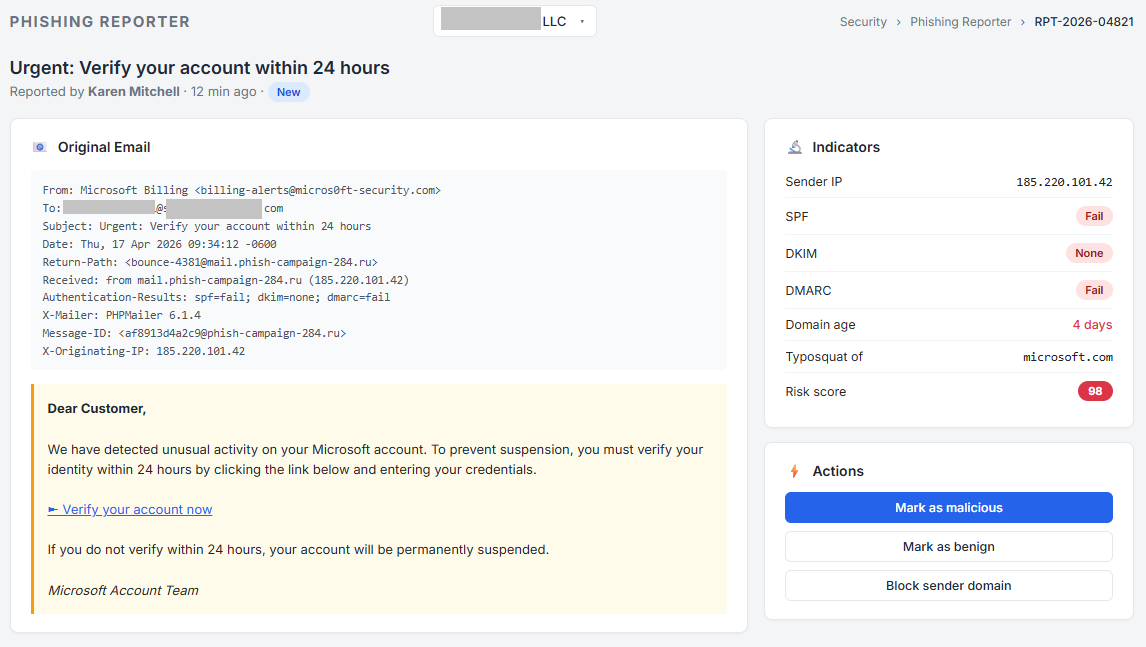
Drill into any report for the full breakdown, pre-analyzed.
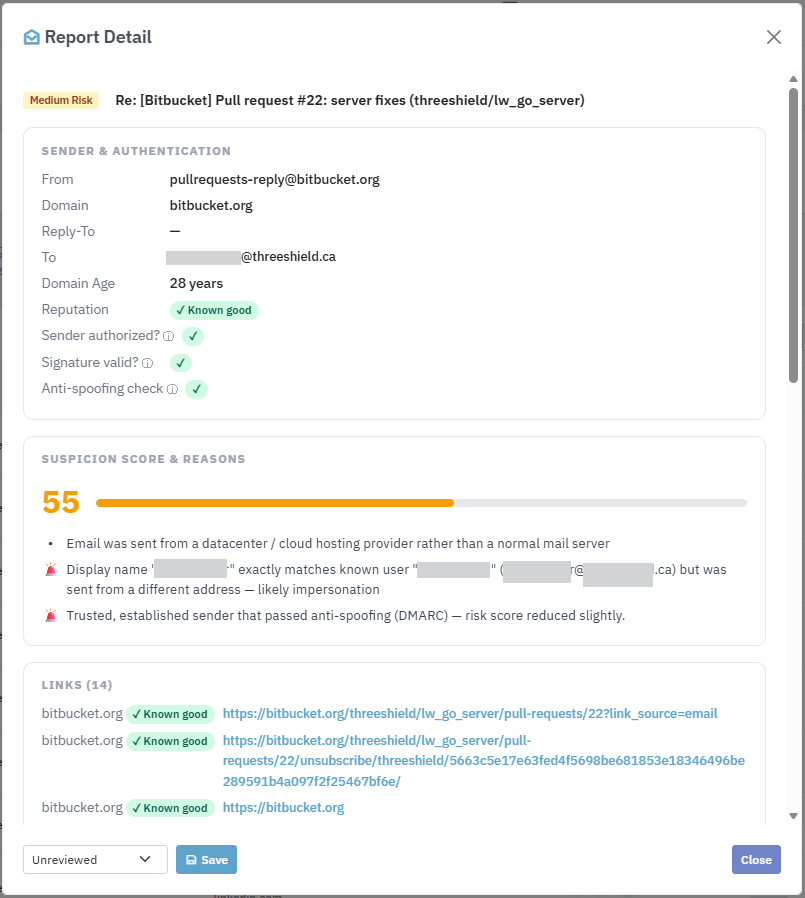
Impersonation caught and explained, with every link scored by reputation.
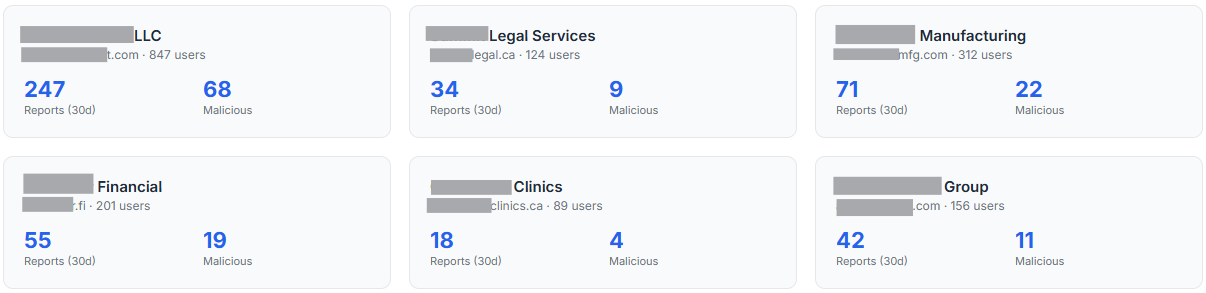
For MSPs: every client tenant from one account, each strictly isolated.
Works everywhere your users open Outlook
Deploy once through Microsoft 365 centralized deployment and the button appears on every client your staff use, with no per-device install. Any mailbox that supports Outlook add-ins can use it, which covers standard user mailboxes and most shared mailboxes in Exchange Online.
- Windows: classic and new Outlook
- Outlook on the web
- Outlook for Mac
- Outlook for iOS (iPhone and iPad)
- Outlook for Android (headers are shown where the mobile API exposes them, with an honest notice where it doesn't)
Closes the loop with your program
Recognize your engaged users
Because Lavawall logs every check even when no ticket is created, you can see who is genuinely watching for phishing and give them positive reinforcement for it.
Security awareness training
Engagement data flows into training, so the people who need coaching get it, and the rest aren't punished with fluff.
Built-in simulations too
Prefer one platform? Lavawall runs phishing simulations natively, so reporting, verdicts, training, and simulations live in one place.
Want the whole workflow off your hands?
ThreeShield, the CISSP and CISA team behind Lavawall®, can take it end to end: we set Lavawall up so most reports never become a ticket, then our analysts manually review and resolve the ones your users ask to have checked, for a flat rate. Your techs stop triaging phishing altogether.
Common questions
- How does Lavawall actually cut the phishing-ticket flood?
- Not by triaging tickets faster. Lavawall gives the user immediate risk information the moment they check a suspicious message, so most "is this safe?" questions are answered on the spot. About 93% of suspected phishes get resolved for the user without a support ticket ever being created.
- If users don't file a ticket, how do I know who is engaged?
- Lavawall still records that the user checked the message, even when no ticket is created. You can see who is actively watching out for suspicious email and reward that good security behaviour with positive reinforcement, so engaged people get recognized instead of ignored.
- Which Outlook clients does it support?
- Classic and new Outlook on Windows, Outlook on the web, Outlook for Mac, and Outlook for iOS and Android. Deploy once through Microsoft 365 centralized deployment and any mailbox that supports Outlook add-ins can use it, including standard user mailboxes and most shared mailboxes in Exchange Online.
- What still reaches my team?
- Only what should: genuinely suspicious or malicious mail, auto-triaged and prioritized with the analysis done, plus visibility into who's engaged and who needs a nudge.