White-label domain scanner
Prove value in 60 seconds, under your own brand.
Embed Lavawall®’s domain scanner on your page with your phone number and URLs on the results. Whether you’re at a networking event or a prospect just landed on your site, run a scan on their real domain and capture their contact details right there.
Start my free trial (no credit card)Try the scanner
Your brand · two-snippet embed · instant lead capture
Embed it in three steps
Open Embed Scanner
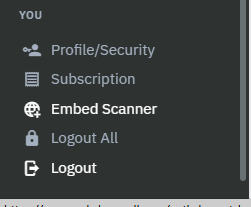
At the bottom of the left side menu, under You, click Embed Scanner.
Add your white-label details
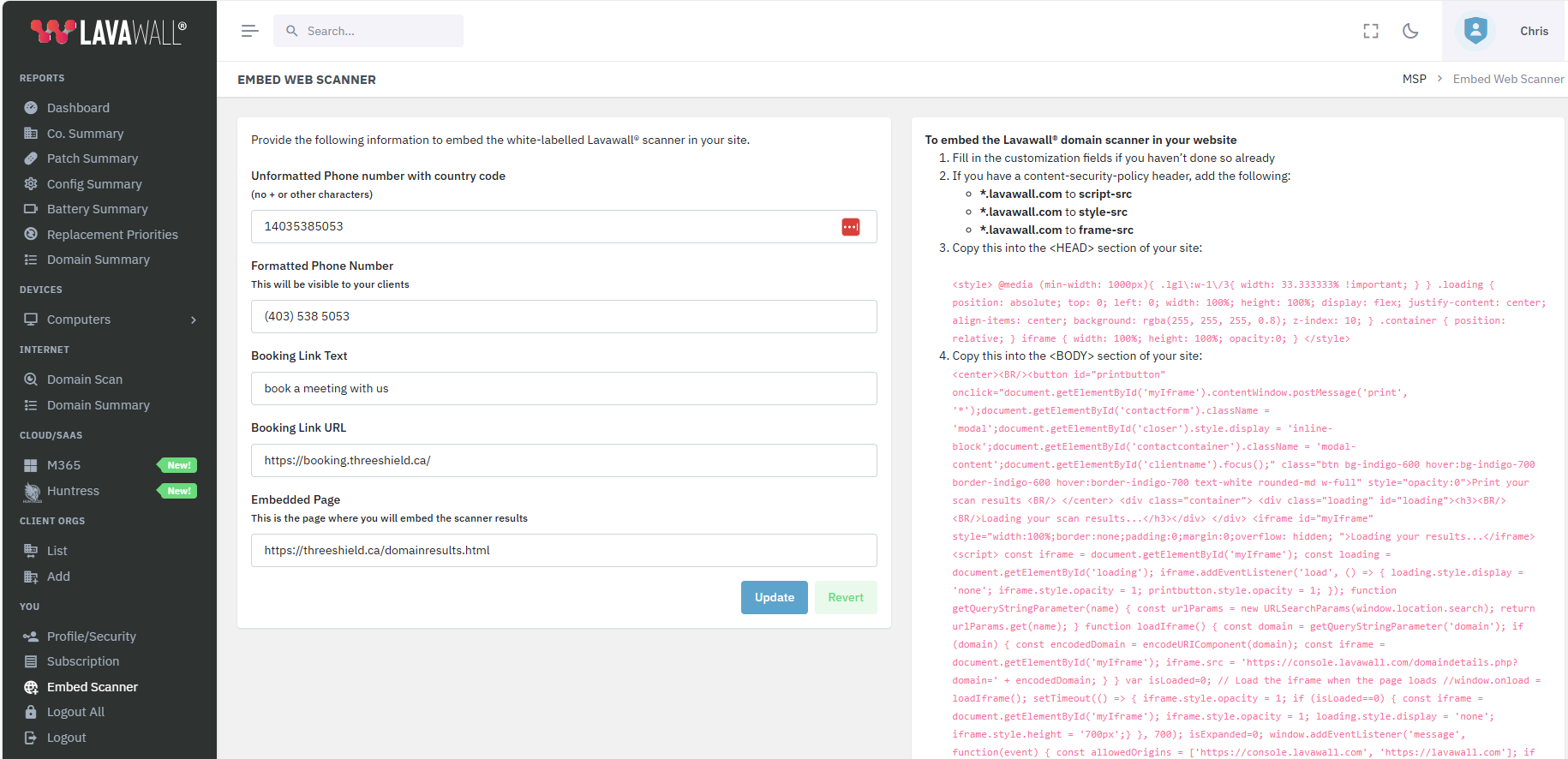
Fill in your phone number and URLs so they appear on the results page. The scan reads as your tool, start to finish.
Copy two snippets
Click the red block to auto-select the <head> code and paste it into your page’s head; do the same for the <body> code. That’s the whole install.
Turn scans into conversations
Every scan shows a prospect real findings about their own domain. That gives them a natural reason to leave their contact details and hear from you.
How the embed works
The scanner goes onto any page as a two-part snippet. One block sits in your page’s <head> and the other in the <body>. Both are generated for you in the console with your white-label details already built in, so there’s nothing to host and nothing to maintain on your side. In the console you click each red code block to auto-select it, then paste it into the matching part of your page.
If your site sends content-security-policy headers, the console shows the exact changes needed for the scanner to load. Make those adjustments (they appear beside the form, or below it on smaller screens), paste the two snippets, and the branded scanner is live.
What your visitors get
A visitor types in their own domain and gets a plain-language read on how their business looks from the outside. The scan is non-intrusive, so it never touches their systems and anyone can run it on the spot. The findings give them something concrete to react to, and give you an honest reason to start a conversation about the quick wins you can offer.
Make it yours (branding)
The white-label form is where you set the phone number and URLs that appear on every results page. Once saved, the scan reads as your own tool from the first click through to the final report, with no third-party hand-off in the middle. You can also copy the link to any result and drop it into a LinkedIn message, SMS, or email to reopen the conversation later.
Want the scanner wired into your funnel?
ThreeShield (the CISSP/CISA team behind Lavawall®) can connect the embedded scanner to your CRM and follow-up so a networking-event scan becomes a booked call.
Common questions
- How do I embed the scanner?
- Open Embed Scanner under the You menu, fill in your white-label details, and paste the head and body snippets into your page. Clicking each red block auto-selects it.
- Whose brand shows on the results?
- Yours. Your phone number and URLs appear on the results page, so it reads as your own tool.
- What is it for?
- Proving value and capturing leads on the spot. At an event or on your site, run a scan on a prospect’s real domain and collect their details.