Accessibility
Accessibility statement
Lavawall® is the console your technicians work in all day: RMM, GRC, breach detection, and ticketing. We want every one of them to be able to use it, including people who rely on assistive technology. This statement explains what we aim for, what we have done, and how to reach us if something does not work for you.
Our target
We hold the Lavawall® platform, and this website, to the Web Content Accessibility Guidelines (WCAG) 2.2 at Level AA, which also covers the Level AA success criteria of WCAG 2.0 and 2.1. WCAG 2.2 Level AA is the technical baseline referenced by EN 301 549 and used across Canadian, US, EU, UK, Australian, and New Zealand accessibility expectations, and it is our design and development standard for new and updated work.
Accessibility in the Lavawall® console
Accessibility for us is about the product, not just the brochure. A technician who relies on a screen reader, a larger text size, or high contrast has to be able to run the RMM, work the GRC evidence, triage a breach alert, and close a ticket, all day, without fighting the interface. We ran a WCAG 2.2 Level AA self-assessment across the console and have been remediating what it found, including colour combinations that did not meet the contrast minimum, keyboard focus, control names, and status messages that assistive technology did not announce. This is an ongoing internal effort and work in progress: we describe it as a self-assessment, and we are not yet making a conformance claim for the console.
Every technician can tailor the console
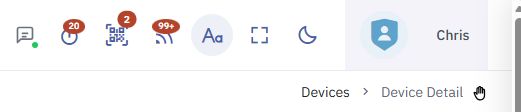
Accessibility is not only something we do behind the scenes; it is a control the person at the keyboard holds. A settings button, marked with an “Aa” icon, sits in the top bar of every console page, including the status portal. Pages with no top bar get a floating button instead.
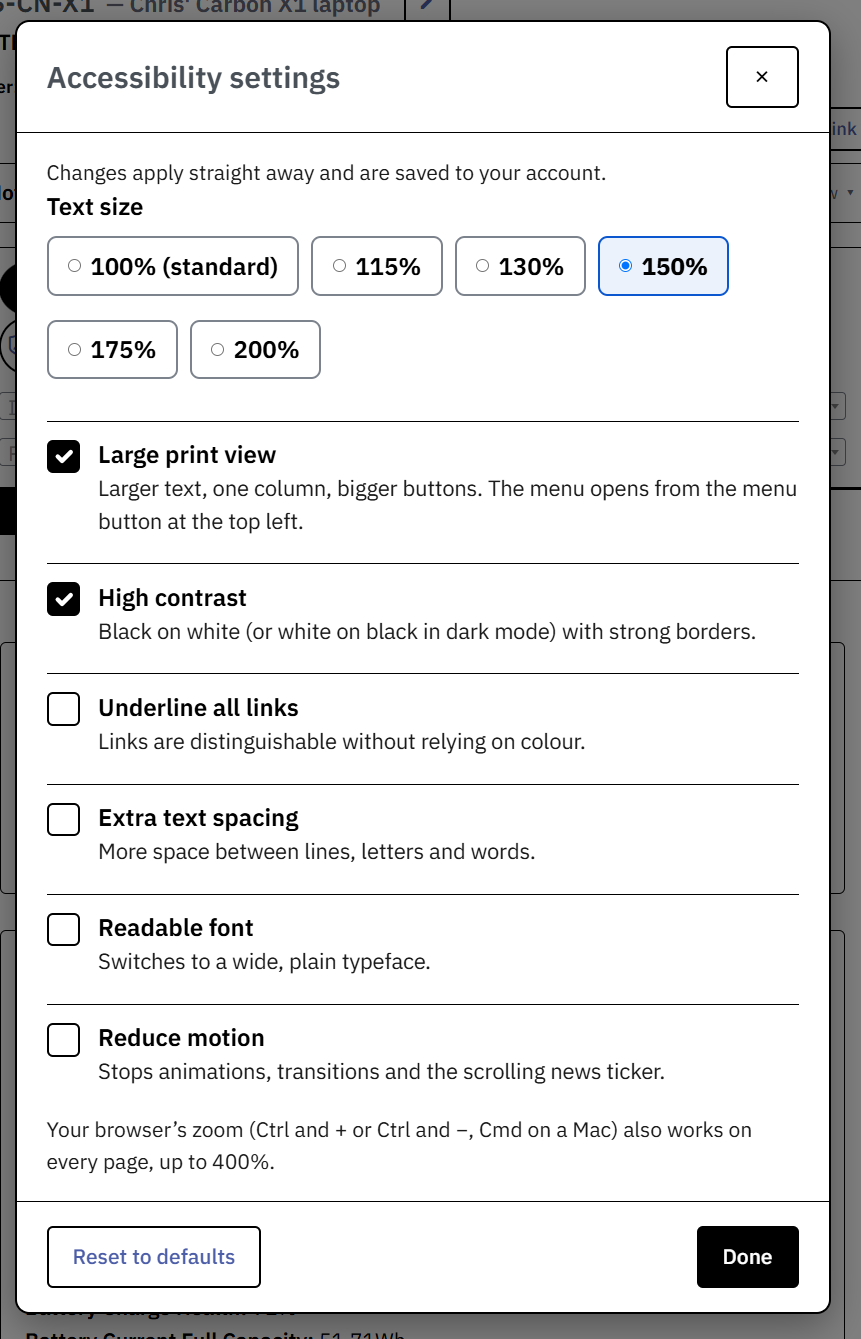
From the dialog, a technician can:
- set text size from 100% to 200%;
- turn on high contrast, light or dark, with strong borders;
- underline all links, so they do not rely on colour;
- add extra text spacing between lines, letters, and words;
- switch to a readable, plain typeface;
- reduce motion, which also stops the scrolling ticker;
- turn on the large print view described below.
Browser zoom (Ctrl and +, or Cmd on a Mac) works on every page as well, up to 400%.
The settings follow the person. When a technician is signed in, their accessibility settings are saved to their account, so they apply on every computer and phone that person signs in on, and take effect before the page first paints. They are private to that user: not shown to administrators, not exported, and deleted with the account. Signed out, the settings are still remembered in the browser.
A responsive large print view
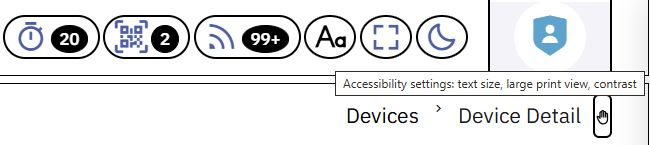
Large print view sets text to 150%, stacks the page into a single column, doubles the size of buttons and fields, and moves the sidebar behind the menu button. Wide tables scroll inside their own card, now at any text size on a narrow screen rather than only in large print view, and nothing scrolls sideways, even on a phone, so a technician working at high magnification is never chasing content off the edge of the screen.
More that we changed across the console
- Larger text reflows cleanly. From 175% text size, the sidebar moves behind the menu button, as in large print view, so the page is not squeezed, and the count badges in the top bar grow with the text instead of overlapping neighbouring icons.
- High contrast covers the controls. Checked checkboxes, radio buttons, and switches are now clearly shown in high contrast, in both light and dark.
- Reduce motion stops the ticker. With reduce motion on, the scrolling news ticker stops; the headlines become a row you scroll yourself, in a taller area.
- Phones and narrow windows. Top-bar icons no longer overlap and none are pushed off-screen; at larger text sizes they wrap onto a second row rather than running off the edge; card headers wrap their buttons under the title; and each table's scroll area can be reached and scrolled with the keyboard and is named after its card for screen readers. Specific screens, including the dashboard's Suspicious ISPs panel and the remote-support toolbar, were fixed, and the toolbar's technician-mode control now has a proper label.
- Stronger defaults for everyone. Darker text and button colours in the same brand hues, and darker field borders, for stronger contrast out of the box; a visible focus ring that never hides under the top bar; larger minimum click targets; a skip-to-content link; and the page title rendered as a real heading.
- Sign-in. The authenticator-code field accepts codes pasted or typed with spaces or hyphens.
The in-house live chat
Our live-chat widget is software we build in house. We reviewed it against WCAG 2.2 Level AA and fixed the issues we found. Text and icon contrast is now calculated automatically for whatever brand colour a customer sets: white text is kept wherever it meets the 4.5:1 ratio, the colour is darkened just enough for white to pass in text areas, and only very light brand colours switch to black text. Icon-only buttons meet the 3:1 non-text contrast requirement. Screen-reader testing continues, so we are not yet calling it fully Level AA, but the review is done and the fixes are applied.
Accessibility Advisory Program
We keep improving the platform with the people who rely on it. If your organization has employees with accessibility needs, join the Accessibility Advisory Program: new clients get a 60-day trial to use Lavawall® and help shape the accommodations we build next, and existing clients who contribute to the program receive credit on their account.
This website
This marketing website is partially conformant with WCAG 2.2 Level AA. Partially conformant means most of the site meets the standard, but some content or components do not yet fully meet it. Recent work includes a skip-to-content link, keyboard focus indicators, reduced-motion support, and correct expand and collapse semantics on frequently-asked-questions sections. The conformance status above applies to this website; the console work described earlier is a self-assessment in progress.
Known limitations
We are honest about where we are not finished. We are aware of, and working on, the following:
- Some colour combinations on decorative or legacy screens may not yet meet the minimum contrast ratio at every size, and are being reviewed and remediated.
- Some downloadable documents produced earlier may not be fully tagged for accessibility. We will provide an accessible version of any document on request.
This is a self-assessment based on our own automated and manual testing, carried out as part of an ongoing internal accessibility review. We update this statement as that work progresses.
Alternatives and accommodations
If any part of the platform or this website is a barrier for you, we will help directly and provide the information or service in a format that works for you, at no charge. Tell us what you need and we will arrange it.
The anti-spam check on our forms is usually automatic and invisible; at most you check a box, so there is no complicated puzzle to solve. Phone and email are always available as alternatives.
How to report a problem
We welcome your feedback. If you encounter an accessibility barrier in the console or on this site, or need content in an alternative format, please use our accessibility feedback and bug-report form, describing the page and the problem. You can also reach us through the phone numbers in the footer. We aim to respond within five business days. Our commitments and timeline are set out in our accessibility plan.
Standards this statement refers to
WCAG 2.2 (and 2.0 / 2.1) Level AA; EN 301 549 (referenced by the European Accessibility Act); and the accessibility expectations of the Accessible Canada Act and provincial standards such as AODA, the Americans with Disabilities Act and Section 508, the UK Equality Act, the Australian Disability Discrimination Act, and New Zealand accessibility guidance. Meeting WCAG 2.2 Level AA is the common technical baseline for all of these.
Last reviewed: September 2026. We review this statement at least annually and after significant changes to the platform or website.