Risk Register
Identify, rate, treat and review the risks to your organization in one place, with a clear record of who accepted what.
What the page is for
A risk register is a core requirement of most security and privacy frameworks. This page lets you record each risk, rate it on a 1 to 5 scale for likelihood and impact, both before controls (inherent) and with today's controls (residual), and decide how to respond.
You can link each risk to the controls that reduce it, and to vendors, business processes, automatic checks and assets. An automatic check can act as the risk's key risk indicator: its latest pass or fail shows whether the risk is getting worse. Treatment plans can be turned into tasks with an owner and due date.
Your organization sets a risk appetite. Any risk whose residual score is above it needs someone to accept it, with a reason and an expiry date of at most a year. The risk library gives you common risks for your industry, already rated, with the controls that address them, so you do not have to start from a blank page.
What you see
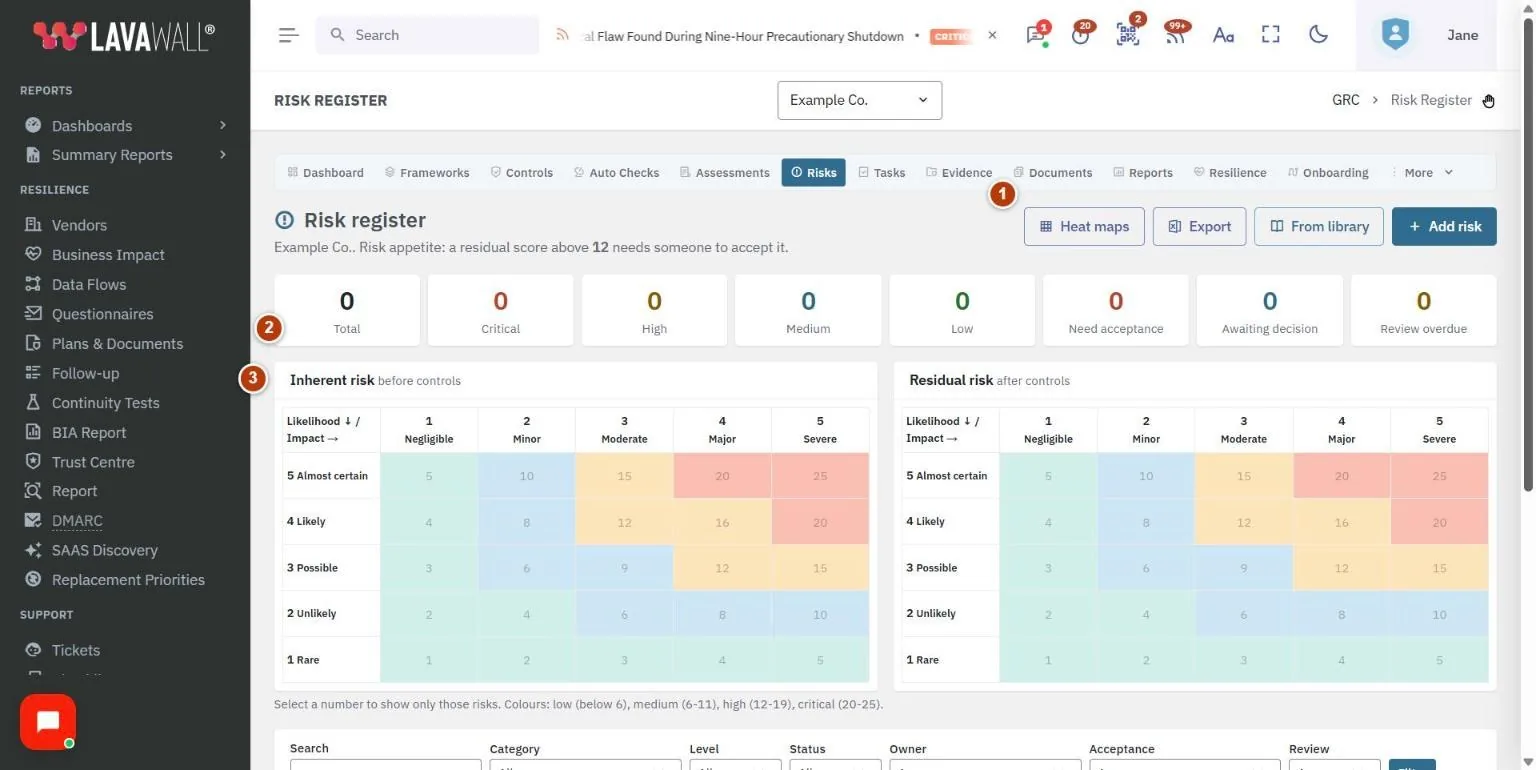
- Toolbar: Heat maps, Export, From library and Add risk.
- Level counts: Total, Critical, High, Medium and Low. Select one to show only those risks.
- Heat maps: Inherent risk before controls and Residual risk after controls, laid out by likelihood and impact.
- Filters: Search, Category, Level, Status, Owner, Acceptance and Review (overdue or due in 30 days), with Filter and Clear.
- Risk table: Code, Risk, Category, Inherent, Residual, Owner, Status, Treatment and Next review, with acceptance badges and View, Edit and Delete buttons.
How to add a risk
- Select Add risk. To start from a ready-made risk, select Start from the library instead.
- Enter the Risk name, choose a Category, and describe What could happen, and why it matters.
- Rate the inherent risk before any controls: choose Likelihood and Impact. The score is shown as you go.
- Rate the residual risk with today's controls in the same way.
- Choose the Owner, Status, Next review date and Response.
- Fill in the Treatment status, Treatment due date and Treatment plan.
- Select the Controls that reduce this risk (hold Ctrl, or Cmd on a Mac, to select more than one) and, optionally, a Key risk indicator.
- Select Save risk. If the risk is above your risk appetite, you are told to treat it further or request acceptance.
How to add risks from the library
- Select From library (or Open the risk library).
- Browse the risks for your industry. Tick Show other industries too to see more.
- Add the ones that apply, then open each one to adjust the ratings and owner.
How to request or give risk acceptance
- Select View on the risk.
- Select Request acceptance and explain why the risk should be tolerated. This is shown to the approver. Select Send request.
- The approver opens the risk, gives a reason of at least ten characters and an expiry date (at most a year from today), and selects Accept risk or Reject.
How to create a treatment task
- Select View on the risk.
- Select the option to create a treatment task, choose who to Assign to, and select Create task. The task appears in your compliance tasks.
How to review, filter and export risks
- Select Heat maps and select a number in a cell to show only those risks. Select Show all to go back.
- Use the filters, for example Review set to Overdue, and select Filter.
- Change Treatment straight from the table using its drop-down.
- Select Export to download the register as a spreadsheet.
Tips
- Score colours: low (below 6), medium (6 to 11), high (12 to 19), critical (20 to 25).
- Acceptance badges tell you where each risk stands: Needs acceptance, Awaiting acceptance, Accepted to a date, or Acceptance expired.
- In the risk's view you can comment and type @ and a name to tell somebody about it. They are emailed the comment.
- If you request an acceptance yourself, it is recorded as self-approved only if your organization allows it.
- Deleting a risk removes its control links, other links and comments. Tasks created for it stay.
Troubleshooting
- "Your GRC role does not include viewing the risk register." Ask an administrator to change your compliance role.
- "This page could not load all of its data." Try again in a minute, and contact support if it keeps happening.
- "Showing the first 5,000 risks." Use the filters to narrow the list.
- "Give a reason of at least ten characters." Acceptance and rejection both need a reason.
Related articles
Still need help?
Search the support centre, or contact our support team and tell us which page you were on.
Names, companies, devices and figures in the pictures are examples. Other product and company names are trademarks of their respective owners.