Compliance Wizard
Answer a few questions about your organization to find out which frameworks and regulations apply, see your gaps, generate your first policies and get a prioritized action plan.
What the page is for
The Compliance Wizard is the quickest way to start a compliance program. It walks you through five steps: Profile, Frameworks, Gap Analysis, Policies and Action Plan.
In the profile step you describe where you operate, your industry, the sensitive data you handle, how you take card payments, your size and structure, government or defence work, critical infrastructure, AI use, existing certifications and what is driving your compliance needs. Follow-up questions appear only when they apply, for example for investment dealers, municipalities or medical device makers. Short explanations ("Why does this matter?") help you answer.
From your answers, the wizard lists the frameworks that are required or recommended for you. It then checks your current controls, documents, evidence and assessment answers against them, fills your details into policy templates, and ranks the controls to work on first. If Lavawall has already detected AI tools in use at your company, the AI question is pre-selected for you.
What you see
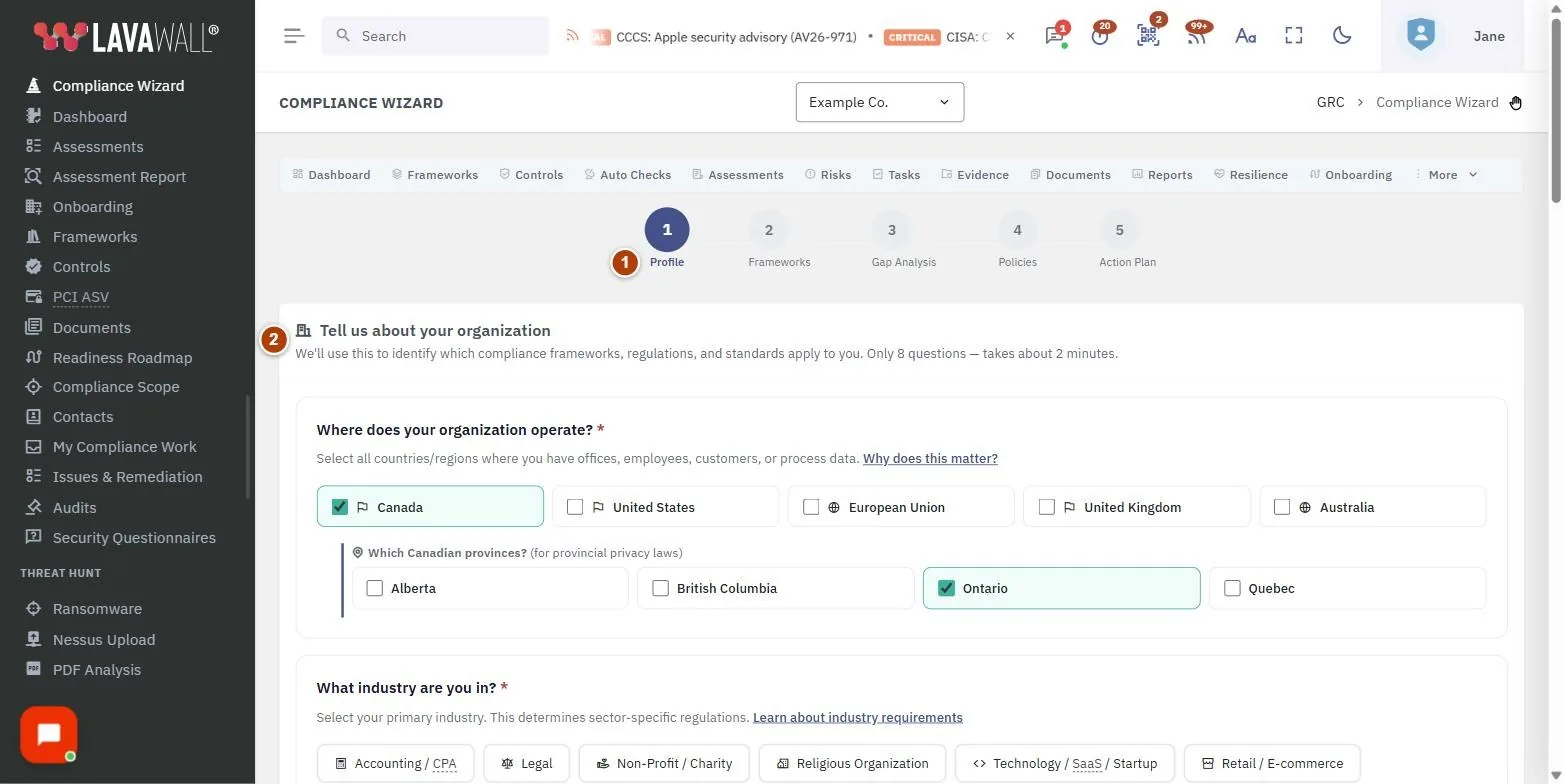
- Step indicator: Profile, Frameworks, Gap Analysis, Policies and Action Plan. Click a step to go back to it.
- Tell us about your organization: the profile questions, ending with Analyze My Requirements.
- Your Applicable Frameworks: frameworks marked Required or Recommended, with the number of unique controls, and Select Required, Select All, Clear All, Adopt selected frameworks and Run Gap Analysis.
- Gap Analysis: how your current controls, policies and evidence compare with each framework, with Adopt these frameworks and Generate Policies.
- Policy & Document Generation: Document Variables and Documents to Generate, with Generate the missing documents.
- Prioritized Remediation Plan: the controls to work on first, with Create tasks from this plan and Go to Full Assessments.
How to find the frameworks that apply to you
- On Profile, answer each question. Select every country or region and every type of sensitive data that applies.
- Select Analyze My Requirements.
- Review Your Applicable Frameworks. Use Select Required to pick the ones you must meet, or select others by hand.
- Select Adopt selected frameworks to add them to your compliance program. Frameworks you already have are left alone.
How to run the gap analysis
- With frameworks selected, select Run Gap Analysis.
- Review the results for each framework.
- If you have not adopted the frameworks yet, select Adopt these frameworks.
How to generate your first policies
- Select Generate Policies.
- Check the Document Variables: Company Name, Policy Owner / CISO, Effective Date, Review Date, EDR Solution, Patch Management Tool, Password Vault, MDM Solution and IR Contact Email. Some are filled in from your company settings.
- Under Documents to Generate, tick the documents you need.
- Select Generate the missing documents and confirm Generate. A draft is created for each selected template you don't already have, and the list links to each one in the Document Library.
How to turn the plan into tasks
- Go to Action Plan to see the Prioritized Remediation Plan, ranked by risk and compliance impact.
- Select Create tasks from this plan. A task is created for each control, skipping controls that already have an open wizard task.
- Select Go to Full Assessments when you are ready for a full assessment.
Tips
- Answer the questions as broadly as is true. The wizard is designed to ask few questions and flag every framework that could apply.
- The document variables are saved for your company when you generate, and used again next time.
- The gap analysis covers up to 12 selected frameworks at a time.
- The plan shows the top 50 controls; Create tasks from this plan covers the top 200.
- Existing certifications you tick help the gap analysis focus on what is new or missing.
Troubleshooting
- "Complete the gap analysis first to generate your remediation plan." Run the gap analysis on the Gap Analysis step first.
- "Select at least one framework." Tick at least one framework before adopting.
- "Congratulations! No significant gaps found in the analyzed frameworks." Nothing major is missing for the frameworks analyzed.
- The adopt, generate and task buttons are missing. These need a GRC role that can edit.
- "Your GRC role does not include access to the compliance wizard." Ask a GRC administrator for a suitable role.
Task guides that use this page
Related articles
Still need help?
Search the support centre, or contact our support team and tell us which page you were on.
Names, companies, devices and figures in the pictures are examples. Other product and company names are trademarks of their respective owners.