Execution Prevention
Stop risky built-in programs and scripts from running at all, starting in Audit so you can see what would break before you enforce.
What the page is for
Elevation rules decide who may run something as an administrator. Execution Prevention decides whether a program runs at all. It lets you block programs attackers commonly misuse, turn on script enforcement, and set Microsoft Defender attack surface reduction (ASR) rules for every Windows computer in the company.
Because a block list can stop software running everywhere, the page always starts in Audit. In Audit nothing is blocked; computers report what would have been blocked. The Enforce option stays unavailable until computers have applied the audit policy and reported what they saw, and until Audit has run for 24 hours.
Programs on the block list are matched by the original file name built into the program, not its location, so renaming a file or copying it to another folder does not get around the block.
What you see
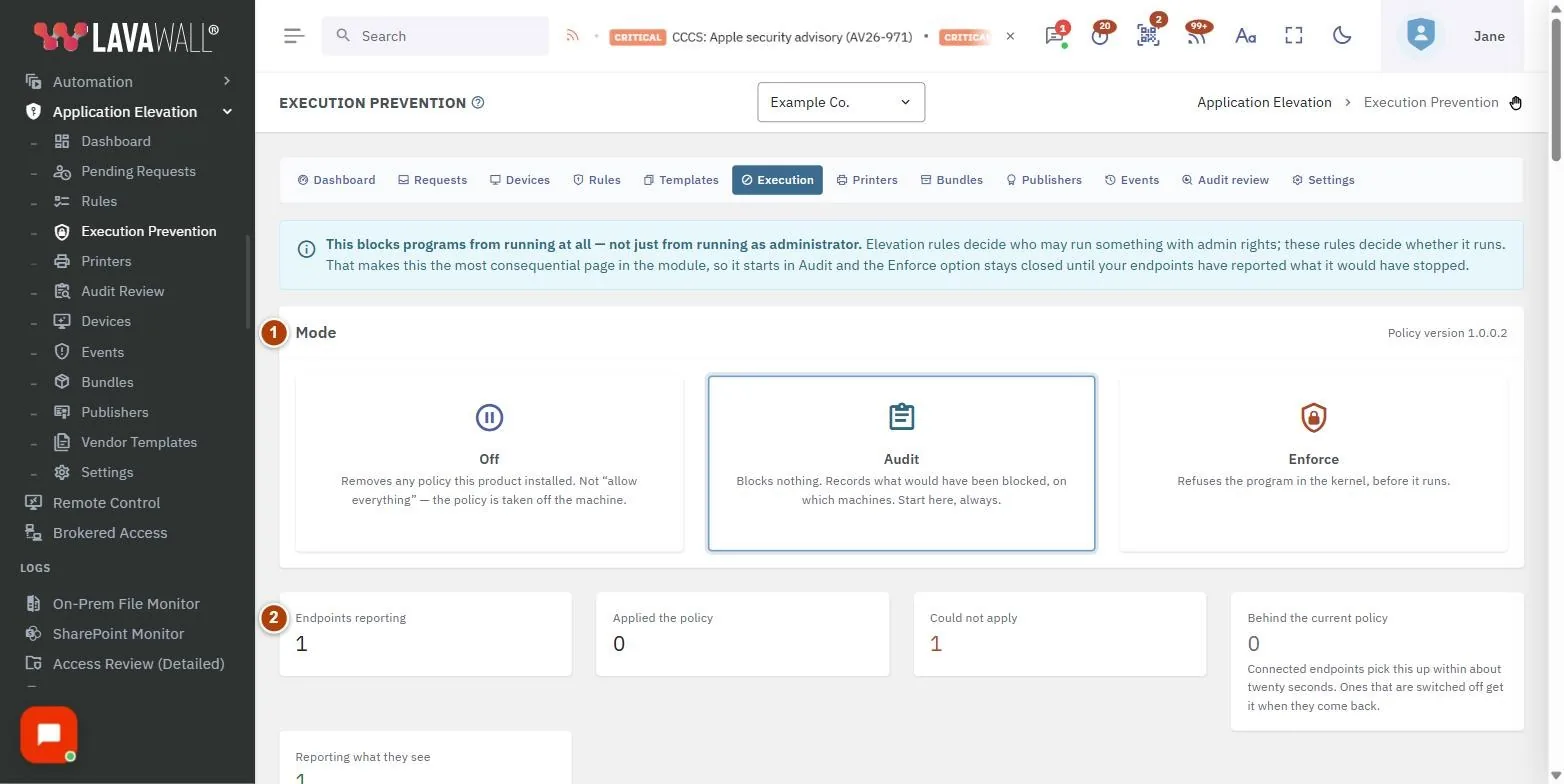
- Mode: Off, Audit and Enforce cards, with the current policy version.
- Fleet tiles: Endpoints reporting, Applied the policy, Could not apply, Behind the current policy and Reporting what they see, plus warnings about computers that cannot be covered fully.
- Programs to block: grouped programs with what each is and what blocking it breaks, and Recommended set. Items marked drastic block a shell.
- Turn on script enforcement: puts PowerShell into Constrained Language Mode and gates VBScript, JScript, HTA and MSXML.
- Attack surface reduction: each Defender rule with Off, Audit, Warn or Block, badges for "living off the land" and "audit first", and Audit the recommended set.
- Save: with a summary of what will change.
- What this would have blocked: Program, Rule, On enforce, Endpoints, Times and Last seen.
- Endpoints: Computer, Mode, State, Notes and Reported.
How to use Execution Prevention
How to start in Audit
- Select the Audit card.
- Select Recommended set under Programs to block, and Audit the recommended set under Attack surface reduction.
- Select Save.
How to check what would break
- Wait for computers to report; watch Reporting what they see on the fleet tiles.
- Read What this would have blocked. Each row shows the program, the rule that caught it, what would happen on enforce, and on how many endpoints.
- Untick any program you rely on, then Save.
How to enforce
- When the Enforce card becomes available, select Enforce.
- Select Save and confirm Enforce on every endpoint in this company?.
- Connected computers pick up the policy within about twenty seconds; others get it when they come back online.
How to turn on script enforcement
- Turn on Turn on script enforcement.
- Give it its own audit period; most management tools use PowerShell.
- Select Save.
How to remove the policy
- Select Off and Save. Off removes the policy this product installed; it is not "allow everything".
Tips
- ASR rules ship with Defender, apply in seconds and cannot make a computer unbootable, so they are worth turning on before the block list.
- Rules marked audit first are known to cause breakage; audit them before setting Block.
- Warn lets the user override an ASR block after a warning.
- An endpoint that never reports is not a quiet endpoint. If Reporting what they see is zero, an empty "would have blocked" list means nobody was watching.
- The policy version shown in the Mode card matches what appears in Windows' own listings, which helps when checking a computer directly.
Troubleshooting
- "Run this in Audit first." when selecting Enforce: No evidence yet. Endpoints must apply the audit policy and report, and Audit must run for 24 hours.
- "Enforce without a full audit period?": You can override with Enforce anyway, but this can stop software on every endpoint. Keep auditing is the safer choice.
- Some endpoints "run a Windows version that cannot apply a block list without a reboot".: Those computers get the Defender rules only.
- "At least one rule could not be matched to a real file": On those endpoints the rule may match nothing. See the Notes column in Endpoints.
- "You can see this policy but not change it.": Ask an administrator for the elevation Admin permission.
Related articles
Still need help?
Search the support centre, or contact our support team and tell us which page you were on.
Names, companies, devices and figures in the pictures are examples. Other product and company names are trademarks of their respective owners.