Add Client
Create a new client organization under your account, with its first user, in a single form.
What the page is for
Add Client sets up a new organization that you manage or audit. You give it a name, a short name and its primary email domain, choose what kind of organization it is, and decide how quickly it receives Lavawall updates.
You can create the organization's first user at the same time and send them an invitation email. Where available, you also choose who may hold a recovery key for the client's password vaults, and which extra compliance standards the organization must follow on top of the ones it inherits from you.
When the organization is created, the page offers a Download Agents button so you can install the Lavawall agent on the client's computers straight away.
What you see
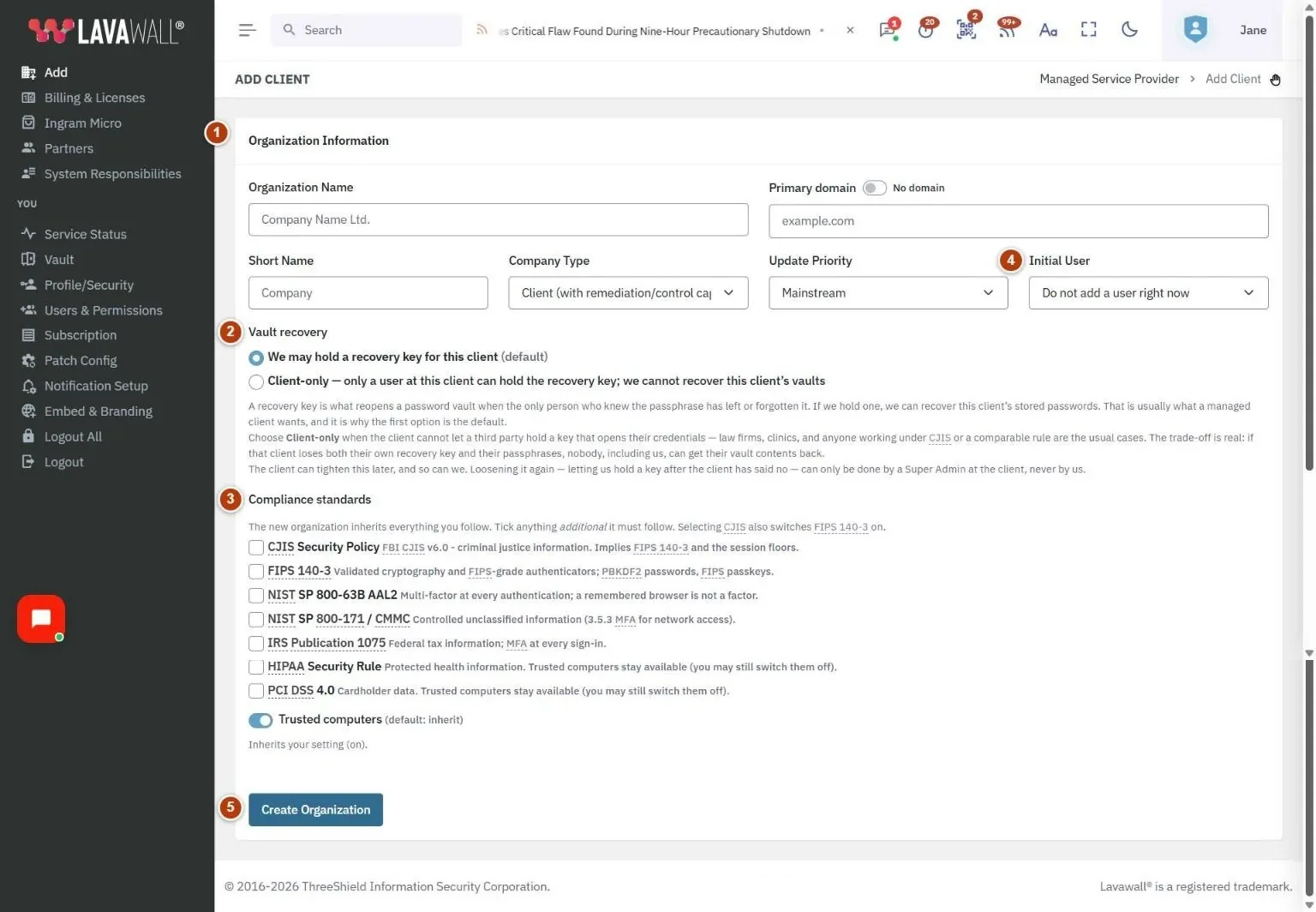
- Organization Information: Organization Name, Primary domain (with a No domain switch), Short Name, Company Type, Update Priority and Initial User.
- Vault recovery: whether you may hold a recovery key for this client, or Client-only.
- Compliance standards: standards inherited from you, extra standards to tick, and the Trusted computers switch.
- Primary User: First Name, Last Name, Phone (with No phone) and Email Address (with Send invitation). Shown only when you choose an initial user.
- Create Organization: checks the form and creates the organization.
How to use this page
How to add a client organization
- Enter the Organization Name. A Short Name of up to 12 characters is filled in for you; change it if you like. It is used in form titles and drop-down menus.
- Enter the Primary domain, such as example.com. If the client has no domain of its own, turn on No domain.
- Choose the Company Type: Client (with remediation/control capabilities), Read-only audit client, Managed IT Service Provider (may have clients), Auditor (read-only, compliance focused) or Stand-alone company (no client capabilities).
- Choose the Update Priority, from Beta tester to Lowest risk. Mainstream is the default.
- Select Create Organization. When you see "Company created.", select Download Agents to install the agent for this client.
How to add the first user at the same time
- In Initial User, choose a role instead of Do not add a user right now. Organization administrator (Client Local IT) gives the user full access to their own organization.
- In Primary User, enter First Name, Last Name and Email Address.
- Enter a Phone number, or turn on No phone.
- Leave Send invitation on to email the user a sign-in link, or turn it off to tell them yourself.
- Select Create Organization.
How to choose vault recovery and compliance settings
- Under Vault recovery, keep We may hold a recovery key for this client (the default), or choose Client-only if the client cannot let a third party hold a key to their stored passwords.
- Under Compliance standards, tick any standards the client must follow in addition to the ones marked inherited.
- Leave Trusted computers on to inherit your setting, or turn it off to require an authenticator code at every sign-in for this organization.
Tips
- The domain is cleaned up as you type: "https://www.example.com/page" becomes "example.com".
- Choose Client-only vault recovery for law firms, clinics and others under rules such as CJIS. If that client loses both its recovery key and its passphrases, nobody can recover the vault contents.
- A client can later tighten its vault recovery choice. Only a Super Admin at the client can loosen it again.
- Selecting CJIS also turns on FIPS 140-3, and some standards do not allow trusted computers; the switch is locked when that applies.
- Use Beta tester or Early adopter only for organizations comfortable receiving updates first.
Troubleshooting
- "Invalid Domain" means the domain is not in the form name.tld, such as example.com. Subdomains and web addresses are trimmed; free email domains such as Gmail are not allowed.
- "Validation Errors" lists what is missing, for example the full company name, a short name between 1 and 12 characters, or the initial user's name, phone or email.
- "Company already exists" means you already have a client with the same name or short name.
- "User was created, but the invitation email could not be sent." The organization and user exist; tell the user how to sign in yourself.
Task guides that use this page
Related articles
Still need help?
Search the support centre, or contact our support team and tell us which page you were on.
Names, companies, devices and figures in the pictures are examples. Other product and company names are trademarks of their respective owners.